
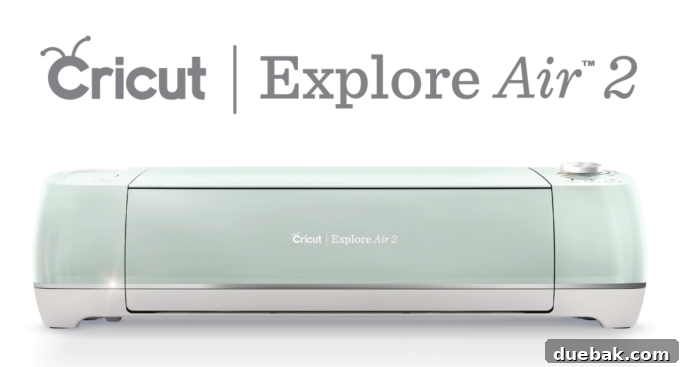
Unlocking Creativity: A Comprehensive Review of the Cricut Explore Air 2
For the crafter, hobbyist, blogger, or any creative soul in your life, the Cricut Explore Air 2 stands out as an unparalleled gift. As a dedicated user myself, I can attest to the transformative power of a Cricut machine. This article aims to provide an in-depth look at why the Cricut Explore Air 2 is not just a tool, but an essential partner in bringing your creative visions to life, offering insights into its capabilities, features, and overall value. Prepare to discover how this smart cutting machine can revolutionize your DIY projects and open up a world of endless possibilities.
What is a Cricut Machine and How Does it Work?
At its core, a Cricut machine is an electronic cutting device designed to precisely cut intricate shapes and designs from a vast array of materials. Far beyond simple paper cutters, these smart machines connect to your computer or mobile device and are controlled via intuitive software, allowing for unparalleled customization and precision that would be impossible with traditional crafting tools.
The versatility of materials a Cricut can handle is truly astounding. Imagine cutting:
- Paper and Cardstock: Perfect for greeting cards, scrapbooking layouts, intricate invitations, beautiful paper flowers, and stunning 3D paper art.
- Vinyl: Transform plain surfaces with custom decals for walls, laptops, car windows, water bottles, and mugs. Heat Transfer Vinyl (HTV) allows you to personalize t-shirts, tote bags, hats, and other fabric items.
- Fabric and Felt: Cut precise patterns for appliqué, quilting projects, creating soft toys, or designing custom patches. The machine ensures clean edges, making sewing projects much simpler.
- Leather: Craft unique jewelry pieces, personalized keychains, small wallets, or decorative accents for bags and garments.
- Chipboard: Ideal for creating sturdy boxes, layered dimensional projects, intricate stencils, or robust embellishments for home decor.
- Other Specialty Materials: Explore possibilities with poster board, craft foam, sticker paper, iron-on vinyl, and even some thin woods for diverse projects.
But a Cricut machine isn’t limited to just cutting. Many models, including the Explore Air 2, feature a dual tool carriage, meaning you can swap out the cutting blade for other specialized tools. The scoring tool creates perfect fold lines for cards, boxes, and other 3D paper crafts, ensuring crisp, professional finishes. Additionally, Cricut pens and markers allow the machine to draw intricate designs, write custom messages in a variety of fonts and colors, or add precise labels to your projects, further enhancing the level of customization you can achieve.
From crafting delicate wedding invitations and creating personalized home decor items to making custom apparel for a small business or even designing unique fishing flies (yes, my husband can attest to this!), the possibilities are truly limitless. The Cricut empowers you to turn everyday items into personalized treasures and ambitious ideas into tangible realities.
Navigating the Digital Crafting World: Cricut Design Space™
One of the most significant advancements in the Cricut ecosystem, particularly with the Explore models, is the shift from physical cartridges to a completely digital, cloud-based platform: Cricut Design Space™. This eliminates the need for bulky physical cartridges, offering unparalleled flexibility, a constantly expanding library of content, and accessibility from virtually anywhere.
Cricut Design Space™ serves as the central hub for all your creative endeavors. This user-friendly software, accessible via a web browser or dedicated app on iOS and Android devices, allows you to design, edit, and send your projects directly to your Cricut machine. Its intuitive interface makes it easy for beginners to jump in, while offering powerful tools for experienced crafters.
Features of Cricut Design Space™:
- Extensive Image Library: Dive into a vast collection of thousands of ready-to-cut designs, shapes, and fonts. Whether you need a simple geometric shape or an intricate illustration, Design Space likely has it.
- “Make It Now” Projects: For those looking for instant gratification or a guided experience, “Make It Now” projects are pre-designed templates with step-by-step instructions. They’re perfect for beginners to build confidence and for experienced users needing quick inspiration.
- Custom Uploads: Unleash your unique creativity by uploading your own SVG, PNG, JPG, or BMP files. This feature is invaluable for designers, small businesses, or anyone wanting to cut highly personalized graphics.
- Powerful Design Tools: Design Space is equipped with a suite of sophisticated tools for manipulating images and text. Features like welding (combining shapes), slicing (cutting one shape from another), attaching (keeping elements together for cutting), and contouring (removing parts of an image) allow you to create complex and unique designs.
For those who crave unlimited access, Cricut Access is a monthly subscription service that provides unlimited use of a growing library of images, fonts, and ready-to-make projects. At a modest monthly fee, it offers incredible value for frequent crafters or small business owners who regularly utilize a wide variety of designs, making it a worthwhile investment for expanding your creative toolkit without constantly purchasing individual assets.
Introducing the Cricut Explore Air 2: Speed, Precision, and Connectivity
The Cricut Explore Air 2 represents a significant leap forward in personal cutting machines, offering enhanced features that streamline the crafting process and elevate your creative output. This model has quickly become a favorite for its balance of power, precision, and user-friendly design.
The “Air” Advantage: Wireless Connectivity
One of the defining features of the Explore Air 2 is its built-in Bluetooth connectivity – hence the “Air” in its name. This allows you to wirelessly connect your machine to your computer (PC or Mac), iPhone, iPad, or Android device. The freedom from cables means you can design on your tablet from the couch and send it to your machine across the room, providing unparalleled flexibility in your workspace and creative flow. It truly transforms your crafting experience by making it more mobile and less cluttered.
Unrivaled Speed: Craft Faster Than Ever
Time is precious, especially when you’re deeply immersed in a creative project. The Cricut Explore Air 2 addresses this with its groundbreaking “Fast Mode,” allowing it to cut up to 2x faster than previous Cricut Explore models. This feature is a game-changer for several scenarios:
- Batch Projects: If you need to cut multiple copies of the same design, such as invitations for a wedding or labels for party favors, Fast Mode significantly reduces production time.
- Intricate Designs: Even complex cuts are handled with impressive speed, ensuring your detailed projects come to life without lengthy waits.
- Small Businesses: For crafters running a small business, this increased speed can boost productivity and help meet tight deadlines, turning creative passion into a more efficient enterprise.
Simply select Fast Mode in Design Space when you’re ready to send your design to the cutting mat, and watch your projects materialize at an accelerated pace.
Design and Aesthetics: A Pop of Color for Your Craft Space
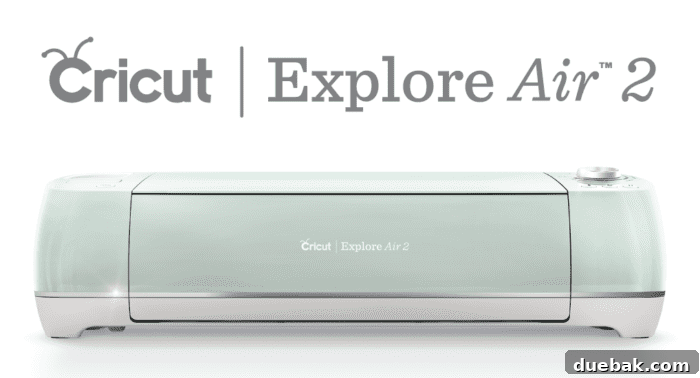
Beyond its powerful functionality, the Cricut Explore Air 2 also boasts a sleek and attractive design. Available in a range of vibrant colors—including the popular mint, rose, blue, and more—it adds a stylish touch to any craft room or workspace. Its compact footprint ensures it doesn’t take up excessive space, blending seamlessly into your creative environment.
Key Features Summary:
The Explore Air 2 also retains and enhances other essential Cricut features:
- Dual Tool Carriage: Cut and score, or cut and draw in a single step, saving time and ensuring perfect alignment.
- Smart Set Dial: This intuitive dial allows you to easily select your material type, ensuring optimal blade depth and pressure for a perfect cut every time, eliminating guesswork.
- Precision Cutting: Renowned for its accuracy, the machine can cut incredibly intricate details, making your projects look professionally crafted.
Getting Started with Your Cricut Explore Air 2: From Box to Creation
Unboxing a new Cricut Explore Air 2 is an exciting moment, but for some, the initial setup can feel a bit daunting. Many new users, myself included, might feel a touch of apprehension about diving into a sophisticated machine. Rest assured, getting started with your Cricut is far simpler than you might imagine, and the platform is designed to ease you into the world of smart crafting.
The first steps involve simply plugging in your machine and connecting it to your computer or mobile device via Bluetooth or USB cable. Once powered on, you’ll be guided through setting up Cricut Design Space. The software itself is incredibly user-friendly, offering a wealth of tutorials and beginner-friendly projects to build your confidence.
Your First Project: A Simple Workflow
Overcoming that initial fear is key. Here’s a simplified overview of how easy it is to make your very first project:
- Choose Your Design: Select a simple shape from Design Space, or pick one of the many “Make It Now” projects specifically designed for beginners.
- Select Your Material: Place your chosen material (like vinyl or cardstock) onto a Cricut cutting mat.
- Adjust Settings: Use the Smart Set Dial on your machine to select the correct material setting, or choose it within Design Space.
- Load the Mat: Load the mat into the machine.
- Start Cutting: Press the flashing “Go” button on your Cricut machine, and watch it work its magic!
You’ll be amazed at how quickly you can go from an idea to a tangible, perfectly cut creation. Don’t be afraid to experiment with the basic features and follow the on-screen prompts; Design Space is designed to hold your hand through the process.
For visual learners, there are abundant resources available. While I made my own basic tutorial video in the past, Cricut itself provides excellent, detailed video guides to walk you through every step, from turning on your machine to executing complex cuts. Exploring these resources, along with community forums and blogs, will empower you to master your machine in no time.
If you’re still feeling a bit nervous, here’s a helpful tutorial video from Cricut that might ease your mind:
And for my initial walkthrough, feel free to check it out as well:
Inspire Your Next Project: Endless Creative Possibilities
The true magic of the Cricut Explore Air 2 lies in its ability to transform everyday items and abstract ideas into personalized masterpieces. Once you’ve mastered the basics, you’ll find yourself constantly inspired by the sheer volume of projects you can undertake. The crafting community around Cricut is vibrant, constantly sharing new ideas and techniques, ensuring you’ll never run out of creative fuel.
Diverse Project Examples:
- Personalized Home Decor: Create stunning wall decals, custom signs with inspiring quotes, unique decorative pillows with iron-on vinyl, or stencil designs for painted furniture.
- Custom Apparel: Design and personalize t-shirts, hoodies, baby onesies, and hats for special occasions, gifts, or even a small business.
- Event Planning: Elevate your parties and celebrations with custom invitations, elegant banners, personalized party favors, and bespoke wedding signage and table numbers.
- Unique Gift-Giving: Craft one-of-a-kind presents like custom cards, personalized mugs, engraved jewelry (with an engraving tool, sold separately), or bespoke scrapbook albums.
- Educational Tools & Organizational Aids: Create flashcards, classroom decorations, labels for pantry organization, or custom planner stickers.
- Small Business Branding: Produce professional-looking product labels, custom packaging, branded merchandise, or window decals to enhance your business’s presence.
Many fantastic projects are possible, like elegant DIY wedding table numbers, impressive giant wooden clocks, custom wedding signs, intricate 3D snowflake ornaments, and even stylish personalized shoes. Each of these diverse creations demonstrates the immense versatility and precision offered by the Cricut Explore Air 2, making previously complex crafts accessible to everyone. Don’t forget to explore all my Cricut projects for more inspiration!
Is the Cricut Explore Air 2 the Right Machine for You?
Considering its impressive features and versatility, the Cricut Explore Air 2 is an ideal choice for a wide spectrum of users. It strikes a perfect balance between advanced capabilities and ease of use, making it accessible for beginners while offering enough power and flexibility to satisfy seasoned crafters and small business owners.
If you are a hobbyist who loves creating handmade cards, personalized gifts, or unique home decor, this machine will elevate your projects with professional-grade precision. For small business owners, the ability to rapidly produce custom merchandise, labels, or packaging elements can significantly streamline operations and expand product offerings. Teachers will find it invaluable for creating classroom aids and decorations, while parents can personalize everything from school supplies to party decorations.
Choosing the Cricut Explore Air 2 is more than just buying a crafting tool; it’s an investment in your creative journey. It empowers you to bring intricate designs to life, experiment with various materials, and add a personal touch to almost anything you can imagine. Its combination of speed, wireless connectivity, and intuitive software makes it a top contender in the world of smart cutting machines, offering immense value for its price point and endless opportunities for creative expression.
Conclusion: Your Gateway to Limitless Creation
The Cricut Explore Air 2 truly is a phenomenal machine that continues to impress with its blend of speed, precision, and user-friendly design. It stands as an indispensable tool for anyone eager to explore the vast world of DIY projects, custom creations, and personalized gifts. Its ability to cut a wide array of materials, coupled with the intuitive power of Cricut Design Space™ and the convenience of wireless connectivity, makes it a top-tier choice for crafters of all skill levels.
Whether you’re looking to streamline your crafting process, start a creative business, or simply enjoy the satisfaction of making something unique with your own hands, the Cricut Explore Air 2 offers a robust and inspiring platform. It’s not just a machine; it’s a gateway to unlocking your full creative potential. Embrace the possibilities and start your next masterpiece with the Cricut Explore Air 2.
This is a sponsored conversation written by me on behalf of Cricut. The opinions and text are all mine.