
Are you eager to dive into the exciting world of digital crafting but feeling overwhelmed by the choices? You’re not alone! The most common questions I receive revolve around Cricut cutting machines: “Which Cricut should I buy?”, “What materials can a Cricut cut?”, and “What accessories are truly essential versus just nice to have?”. Today, we’re addressing these frequently asked questions head-on to help you confidently choose the perfect Cricut machine for your creative journey.
Which Cricut Machine Should You Get? A Comprehensive Buying Guide
Deciding on the right Cricut machine is the first crucial step in unlocking your crafting potential. With several excellent models available, the best choice ultimately depends on the types of projects you envision creating and your crafting aspirations. Understanding the unique capabilities of each machine is key to making an informed decision. For a detailed side-by-side comparison, you can explore our in-depth Cricut Machine Comparison guide.
Defining Your Crafting Vision: What Kind of Projects Do You Want to Make?
Before committing to a specific Cricut model, take a moment to imagine your ideal crafting projects. This vision will be your compass in navigating the options:
Vinyl Enthusiast?
If your passion lies in personalizing everyday items like cups, mugs, laptops, or creating custom apparel with iron-on vinyl (also known as Heat Transfer Vinyl or HTV), you’ll be pleased to know that both the Cricut Maker and the Cricut Explore series machines are incredibly adept at cutting all types of vinyl with precision. These versatile machines open up a world of possibilities for custom decals, t-shirts, tote bags, and home decor.
New to vinyl? It can be confusing with all the different types and numbers! To clarify the distinctions and understand which vinyl is best suited for your specific project, check out our Ultimate Craft Vinyl Guide. It breaks down everything you need to know about adhesive vinyl, iron-on vinyl, stencil vinyl, and more.
Serious Crafter or Aspiring Maker?
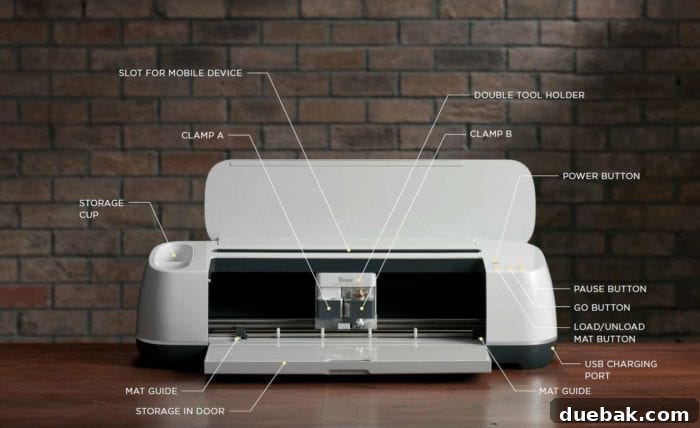
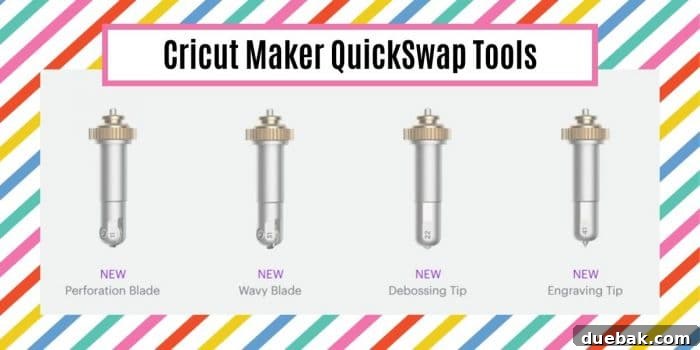
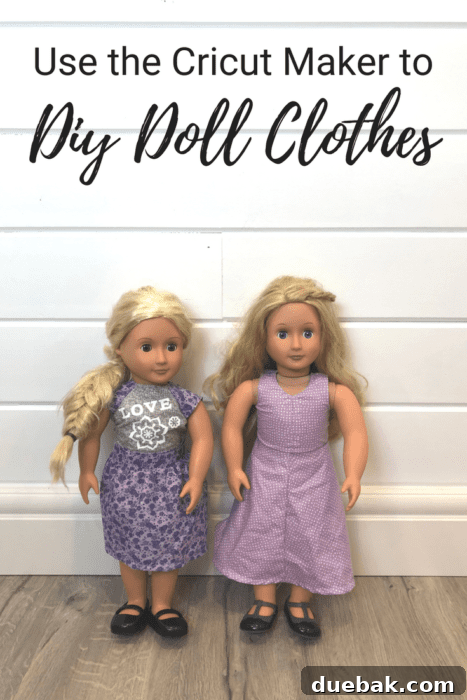
For those with broader ambitions, perhaps involving more intricate materials or advanced crafting techniques, the Cricut Maker truly shines. If you’re a keen sewer looking to cut fabric for quilting or intricate sewing projects – from doll clothes to intricate appliqué pieces – you will absolutely adore the Maker’s unique Rotary Blade. This specialized blade glides through fabric like butter, leaving clean, precise cuts without the need for backing material, saving you immense time and frustration. The Maker also offers a robust adaptive tool system that supports a wider range of tools, enabling advanced techniques such as engraving, debossing, perforation, and wavy cuts with the various QuickSwap Tools. If your projects might involve thicker materials like balsa wood, leather, or chipboard, the Maker is the undisputed champion.
To help you deep dive into specific product comparisons and advanced project ideas, we recommend exploring these valuable resources:
- Cricut Maker vs. Cricut Explore Air Machines: A Detailed Comparison
- Beyond T-Shirts: Exploring Unique Surfaces for Iron-On Vinyl Projects
- The Ultimate Vinyl Guide: Understanding Each Type and Its Best Use
- Your Essential Guide to the Cricut Explore Machine
- Introducing the Cricut Maker: What Makes It Revolutionary
Unleash Your Creativity: What Materials Can a Cricut Machine Cut?
One of the most exciting aspects of owning a Cricut machine is the sheer variety of materials it can cut, transforming your creative ideas into tangible projects. While all Cricut machines handle common crafting materials, their cutting capabilities vary significantly by model:
Cricut Maker: The Ultimate Material Maestro
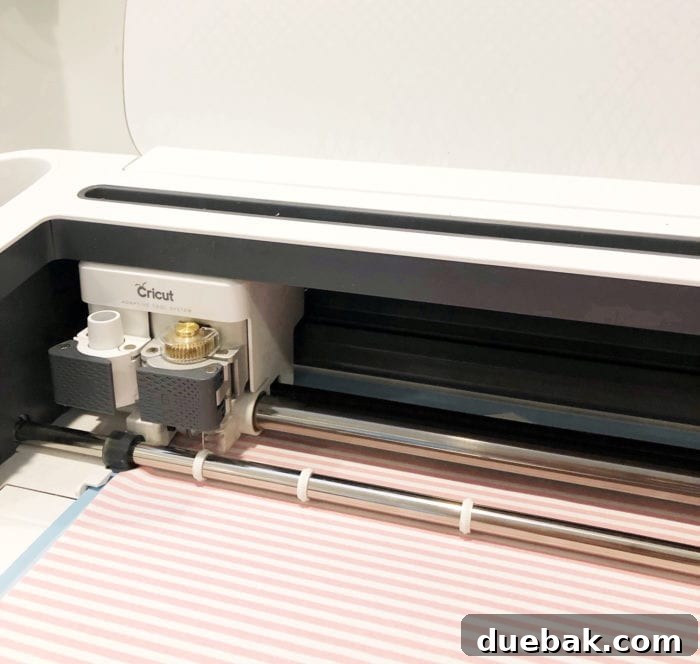
The Cricut Maker is renowned for its unparalleled versatility, boasting the ability to cut over 300 different materials. It inherits all the core functionalities of the Cricut Explore series but elevates them with its Adaptive Tool System. This intelligent system allows the Maker to apply up to 10 times more cutting force, enabling it to work with a vast and impressive range of materials. Key capabilities include:
- Delicate Fabrics: Utilizing the revolutionary Rotary Blade (included with the Maker!), you can precisely cut unbacked fabrics like cotton, felt, denim, silk, and even delicate lace. This is a game-changer for sewing enthusiasts, making quick work of small, intricate pattern pieces – think tiny doll clothes or detailed appliqué designs. For anyone who dreads hand-cutting fabric, the Rotary Blade is a dream come true, saving both time and frustration.
- Thick Materials: With the Knife Blade (sold separately), the Maker can tackle materials up to 2.4 mm thick, such as balsa wood, basswood, heavy chipboard, and craft foam. This opens doors to 3D models, intricate puzzles, and robust home decor items.
- Paper & Cardstock: From standard printer paper to heavy glitter cardstock, poster board, and specialty papers like watercolor paper, the Maker handles them all with finesse.
- Vinyl & Iron-On: Like the Explore, it cuts all types of adhesive vinyl and iron-on vinyl for custom decals, apparel, and signage.
- Leather: Craft stunning leather accessories, jewelry, or embellishments.
- Specialty Materials: Engrave metal sheets, deboss leather, perforate tear-away lines, or create wavy edges with the various QuickSwap Tools.
Cricut Explore Series: Your Everyday Crafting Powerhouse
The Cricut Explore machines, such as the Explore Air 2 and Explore 3, are incredibly popular for their balance of affordability and extensive capabilities. They can cut over 100 different materials, making them perfect for a wide range of popular DIY projects:
- Paper & Cardstock: The Explore excels at cutting various weights of paper and cardstock for cards, scrapbooking, party decorations, and intricate paper crafts.
- Vinyl & Iron-On: These machines are absolute workhorses for vinyl projects, cleanly cutting adhesive vinyl for wall decals, car decals, personalized mugs, and HTV for custom t-shirts, bags, and hats.
- Faux Leather & Craft Foam: Great for smaller accessories and embellishments.
- Bonded Fabric: While not cutting unbacked fabric like the Maker, the Explore can cut bonded fabric (fabric with an iron-on backing) for appliqué projects.
- Poster Board & Specialty Paper: Easily cut materials for school projects, stencils, and more.
Cricut Joy & Joy Xtra: Compact Creativity on the Go
For quick projects, smaller designs, and maximum portability, the Cricut Joy and its newer counterpart, the Joy Xtra, are fantastic. They specialize in cutting:
- Smart Materials: These machines are optimized for Cricut Smart Materials (vinyl, iron-on, label paper, cardstock) that can be cut without a mat.
- Paper & Cardstock: Perfect for greeting cards, labels, gift tags, and small decals.
- Infusible Ink: Both Joy models can work with Infusible Ink sheets for vibrant, permanent transfers onto compatible blanks.
Is the Cricut Maker Worth the Price? Evaluating Your Investment
The question of whether the Cricut Maker justifies its price tag is a common one. Like any significant purchase, its value is directly tied to your intended use and creative goals. However, for many, the Maker represents an incredible investment that quickly pays for itself.
Why the Maker is a Smart Investment:
- Unmatched Versatility: The ability to cut hundreds of materials, from delicate silk to thick balsa wood, with precision allows for an expansive range of projects that no other single cutting machine can match. If you envision tackling diverse crafts, from elaborate sewing projects to intricate woodworking or engraving, the Maker saves you from needing multiple specialized tools.
- Time-Saving Efficiency: Features like the Rotary Blade for fabric cutting or the Knife Blade for thicker materials dramatically reduce manual labor and increase accuracy, making complex projects more accessible and enjoyable. This efficiency is particularly valuable for serious hobbyists or small business owners.
- Adaptive Tool System: The QuickSwap Tools expand the Maker’s functionality far beyond simple cutting. The engraving tip, debossing tip, perforation blade, and wavy blade add professional-level finishing touches to your projects, enhancing their perceived value.
- Long-Term Value: While the initial cost is higher, the Maker’s robust construction and future-proof design ensure it will remain a cornerstone of your crafting studio for years to come. It’s an investment in your creative journey.
Ways Your Cricut Can Pay For Itself:
Beyond the joy of creating, a Cricut machine, especially the Maker, can offer tangible financial benefits:
- Monetize Your Craft: Many crafters turn their passion into profit by selling personalized items made with their Cricut – custom t-shirts, unique home decor, personalized gifts, party decorations, and much more. The Maker’s ability to handle diverse materials gives you a competitive edge in various niche markets.
- Save Money on Gifts and Decor: Think of all the money you’ll save by making thoughtful, handmade gifts for friends and family for birthdays, holidays, and special occasions. You can also create custom home decor, seasonal decorations, and party supplies at a fraction of the cost of buying them retail.
- Educational and Hobby Enhancement: For educators, hobbyists, or those with unique niche interests like cosplay or model making, the Maker provides the precision and versatility to bring intricate designs to life that would otherwise be impossible or prohibitively expensive.
Ultimately, if you’re passionate about crafting and plan to regularly utilize its extensive capabilities, the Cricut Maker is absolutely worth the initial investment. It’s a powerful tool that expands your creative horizons and offers excellent value over time.
For beginners looking to jump right into crafting, I highly recommend exploring the machine bundles that include essential materials and tools. These bundles provide everything you need to start creating immediately, making your entry into Cricut crafting smooth and enjoyable.
Essential Cricut Accessories and Tools: What You Really Need
Once you’ve chosen your Cricut machine, a few essential accessories will ensure you have the best crafting experience from day one. While Cricut offers a vast array of tools, some are truly indispensable, while others can be acquired as your crafting journey evolves.
Must-Have Accessories for Every Cricut Owner:
- Cutting Mats: These are fundamental. Different mats offer varying levels of adhesion for different materials:
- StandardGrip Mat (Green): Your everyday mat for medium-weight materials like cardstock, iron-on, adhesive vinyl.
- LightGrip Mat (Blue): Perfect for delicate materials such as printer paper, light cardstock, vellum.
- StrongGrip Mat (Purple): Essential for heavier materials like specialty cardstock, chipboard, and fabric with a backing.
- FabricGrip Mat (Pink): Exclusively for the Cricut Maker, designed for cutting unbacked fabric with the Rotary Blade.
Having at least a StandardGrip and a LightGrip mat (and FabricGrip if you have a Maker) is crucial.
- Basic Tool Set: This typically includes:
- Weeder: Indispensable for removing tiny negative pieces from vinyl and iron-on designs.
- Scraper: Excellent for adhering material to your cutting mat, burnishing designs onto surfaces, and cleaning your mat.
- Spatula: Helps lift delicate cuts from your mat without tearing or curling.
- Scissors: For trimming materials before and after cutting.
- Extra Blades: Your machine will come with a Fine-Point Blade, which is great for most projects. However, having a spare is wise. If you plan to cut thicker materials, investing in a Deep-Point Blade for Explore machines or a Knife Blade for Maker machines is essential.
Highly Recommended (But Not Always Day-One Essentials):
- Cricut Pens: Expand your creative options by allowing your Cricut to draw and write. Perfect for personalized cards, labels, and intricate designs.
- Cricut EasyPress: If you’re serious about iron-on projects, an EasyPress (or a heat press) provides consistent, even heat for professional, long-lasting transfers that a household iron simply cannot match.
- QuickSwap Tools (for Maker): As discussed, these tools – like the engraving tip, debossing tip, perforation blade, and wavy blade – unlock advanced techniques and material capabilities specific to the Cricut Maker. Acquire these as your project needs expand.
- Brayer: Helps flatten materials and ensure strong adhesion to the cutting mat, especially useful for fabric and larger pieces.
- BrightPad: A backlit work surface that makes weeding intricate designs much easier on your eyes.
Starting with the essentials will get you crafting quickly and confidently. As you explore more advanced projects and materials, you can gradually expand your tool collection to match your evolving creative needs. Many bundles include a good starter set of tools and materials, making them an excellent choice for new users.
Embark on Your Cricut Crafting Adventure!
Choosing the right Cricut machine and understanding its capabilities is the first step towards a fulfilling and boundless crafting experience. Whether you opt for the versatile Cricut Explore, the powerful Cricut Maker, or the compact Cricut Joy, each machine is designed to bring your creative visions to life with precision and ease. From custom t-shirts and personalized gifts to intricate home decor and detailed sewing projects, the possibilities are truly endless. We hope this guide has illuminated the path and answered your pressing questions, empowering you to make the best choice for your unique crafting journey. Happy making!
Everything You Need to Know About the Cricut Joy Xtra
Think Outside the Tee: Explore Unique Surfaces For Iron-On Vinyl
Where To Get Free SVG Files For Cricut and Silhouette
Cricut Watercolor Markers, Brush Set, and Cards
Shirt Design Sizing and T-Shirt Placement Guide
Cricut Hat Press: Everything You Need To Know
Print Then Cut Stickers With Cricut
How To Address Envelopes With Cricut
Cricut Machine Comparison
Cricut Maker QuickSwap Tools
Brooklyn Berry Designs Portfolio
Customize With Cricut Design Space Tools
Monogram Design For Beginners
Cricut Design Space For Beginners
10 Best Script Fonts for Pins
How To Use Mock-Ups
The New Cricut Joy Machine
5 Easy Cricut Explore Projects
5 Things I Love About My Cricut Explore Air 2
Best Cricut Access Fonts
How to Upload Your Own Images With Cricut
How To Use Cricut Infusible Ink Sheets
How To Upload A SVG File To Cricut Design Space
See The New Cricut EasyPress Totes
Where to Buy Craft Vinyl in Canada
The Ultimate Craft Vinyl Guide
Cricut Maker vs. Explore Air 2
Cricut EasyPress 2
Cricut Design Space – Slice Tool Tutorial
Cricut Tricks And Tips – Hacks You Need To Know