
Demystifying Technical Blogging: A Guide for Amateurs and Aspiring Creators
Many of you have reached out, eager for insights into the technical side of blogging and basic coding. I’ll admit, approaching this topic gives me a moment of hesitation, as I consider myself very much an amateur in this vast digital landscape. Offering web design guidance sometimes feels akin to a waiter attempting to teach a chef how to cook – I can certainly describe the components of the meal, but crafting the entire menu might reveal the limits of my expertise. My journey, like many others, has largely been a process of trial and error, coupled with a significant amount of strategic Googling for answers.

Despite my humble self-assessment, I have, through persistent effort, managed to develop and maintain this blog (with invaluable input from Sherry on aesthetics and functionality) with virtually no professional outside assistance. Our primary external support has come from our host’s customer service and the occasional troubleshooting session with a tech-savvy friend when faced with perplexing site crashes. So, while I may not be an expert, I must be navigating this space with some degree of competence. If you’re reading this as someone even newer to the blogging world, please consider my advice a starting point, to be adapted to your unique situation. And for the seasoned professionals, I welcome your insights and supplementary suggestions for anyone seeking technical and coding guidance.
My Journey into the Digital Realm: A Background in Basic Code
This blog was far from my initial encounter with coding. My high school curriculum included a mandatory Computer Science course, where at the age of fifteen, I was introduced to C++ and a foundational understanding of HTML. For those whose high school experience didn’t include such ‘geeky’ subjects, excellent resources like W3Schools.com offer fantastic introductory lessons. While I retain very little of my C++ knowledge, it instilled in me a crucial understanding of how code operates – and, perhaps more importantly, how it can spectacularly fail when something as minor as a single closing bracket is misplaced. I leveraged my nascent HTML skills to build simple, casual websites during high school, including this wonderfully embarrassing, yet still accessible, Geocities site for my high school band’s French Horn section. Beyond these basics, I never formally pursued more complex languages like CSS, JavaScript, or the myriad other programming languages that power the modern web. If my fascination with technology isn’t already evident, perhaps this photograph of me sporting a “Technology: No Place For Wimps” Dilbert sweatshirt will leave no doubt about the geeky DNA running through my veins.

The Entry Point: Embracing the Code-Free Blogging Path
One of the most appealing aspects of contemporary blogging platforms like WordPress.com, Blogger, and Tumblr is the ability to create and manage a blog without needing to write a single line of code. These platforms are designed for ease of use, making blogging accessible to anyone who can compose an email and upload a photograph. This was precisely how we began our blogging adventure. For our first five months, we operated on a free WordPress.com account, where our ‘blog design’ efforts were limited to simply resizing a header image. This approach offers significant advantages for beginners: you avoid the complexities of hosting, server management, and coding. It’s an excellent way to dip your toes into content creation, test your ideas, and build an audience without the initial technical overhead. However, it also comes with limitations in terms of customization, control over your site’s data, and sometimes even monetization options. If the thought of coding or intricate web design feels daunting, starting with a robust, code-free platform might be the ideal route for you to establish your online presence.
The Foundation: Selecting the Right Web Host for Your Blog
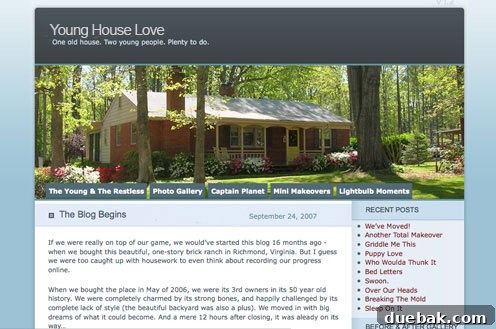
As our blog grew and our aspirations for greater design flexibility expanded, we transitioned to a self-hosted WordPress.org setup in February 2008. This crucial step meant that our site no longer resided freely on WordPress’s servers; instead, we needed to find and pay for our own web hosting. Choosing a reliable web host is paramount for any self-hosted blog, directly impacting your site’s speed, uptime, security, and scalability. It’s a decision that can make or break your site’s performance and user experience. Initially, we opted for BlueHost, a provider frequently recommended by WordPress.org, which was incredibly affordable at less than $30 per year at the time. Our site shared a server with approximately 99 other smaller blogs, making it a cost-effective solution for a growing project. This shared hosting model is common for new bloggers, as it keeps expenses low by distributing server resources among multiple users.
However, as our traffic surged, we eventually outgrew this arrangement. Our site began to regularly crash, unfortunately taking down all 99 other sites on the shared server with us – a testament to our unexpected growth, albeit with some collateral damage! This led BlueHost to, understandably, give us the boot. After considerable research into more robust solutions, we found our home at LiquidWeb. Here, we benefited from our own dedicated server and exceptional customer support, a vital component for any rapidly expanding online venture. While the cost represents a significant leap from our initial $30 a year (try adding two zeros to that figure!), it’s a necessary investment for a full-time blogging operation with substantial traffic. Investing in quality hosting is a critical aspect of scaling, ensuring your site can handle increased visitors and maintain optimal performance, which is a wonderful problem to have when your blog experiences significant growth.
Optimizing Your Digital Assets: The Importance of Image Hosting
When we made the switch to LiquidWeb, we also adopted the strategic advice of hosting our images separately from our main website. This practice significantly reduces the load on a single server, enhances site speed, and can help manage overall hosting costs. Initially, we experimented with free or nearly-free platforms like Flickr and Photobucket, appealing to our budget-conscious approach. However, these platforms presented a challenge when numerous readers reported that such sites were blocked in their workplaces – not that any of you would ever browse blogs while at work, of course! This feedback prompted us to transition to a more professional, paid image hosting solution: Amazon S3, a service we observed larger, successful websites utilizing effectively. Amazon S3 is a highly scalable and reliable cloud storage solution, ideal for managing vast libraries of images and other media assets.
Over time, as our blog’s traffic and content expanded, so did our volume of photos, and consequently, our image hosting expenses. It might sound staggering, but we now invest tens of thousands of dollars annually simply to host our images. This substantial cost underscores a vital lesson: as your blog grows, so too will your operational expenses. However, these hosting costs are an integral part of maintaining a full-time blogging business. Our priority has always been to ensure that our content, especially our visually-driven posts, is accessible to as many readers as possible. High-quality images are often the most engaging part of our content, and ensuring their fast and reliable delivery worldwide is crucial for a positive user experience. This strategic separation of image hosting from web hosting is a best practice for performance and scalability, particularly for image-heavy blogs.
Crafting Your Brand Identity: Establishing a Cohesive Theme
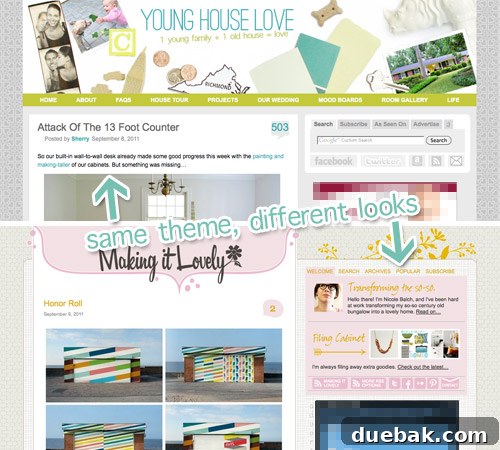
A blog theme is the aesthetic blueprint of your website, dictating its overall look and feel – from color schemes and page layouts to typography and navigation. WordPress, being highly versatile, offers a plethora of built-in themes, but you can also explore and acquire premium themes from third-party developers (though these often come with a cost). For the truly ambitious, designing a custom theme from scratch is an option, offering unparalleled control. However, for most bloggers, including myself, the more practical approach is to select an existing theme and customize it to align with your brand and vision. Our blog, for instance, utilizes a free theme called “WP Premium,” which we discovered through Nicole at Making It Lovely. Our two websites stand as excellent examples of how a single theme can be extensively customized to produce distinct and unique visual identities, demonstrating the power of thoughtful personalization even with a shared template.
When selecting a theme, consider its fundamental functionalities. Do you need a specific number of columns, a particular navigation style, a traditional layout, or perhaps a dynamic magazine-style theme, similar to Layla & Kevin’s blog? Prioritize themes that offer the core structure and features you desire, as this approach minimizes the need for extensive coding from scratch. Look for themes that are responsive (adapt well to various screen sizes), well-supported, and regularly updated. A good theme provides a solid foundation, allowing you to focus on content creation while still achieving a professional and branded online presence through strategic customization rather than deep coding knowledge.
The Art of Presentation: Styling Your Blog with CSS
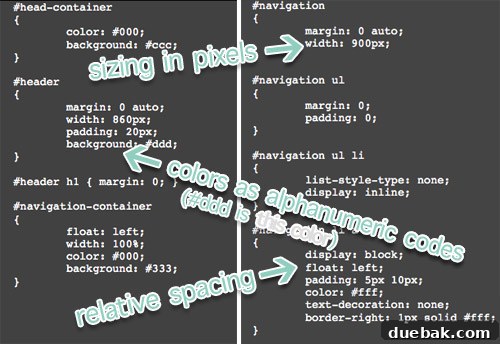
If your chosen theme is structured like ours, its visual presentation is heavily reliant on Cascading Style Sheets, universally known as CSS. CSS is essentially a collection of rules (often stored in one or more files) that dictate how your website’s elements appear when loaded in a browser. Instead of manually specifying the size and color of every blog title or link individually, your theme references these style sheets, ensuring a consistent and efficient application of design guidelines across your entire site. For example, our theme uses separate style sheets: one to manage the layout and positioning of elements (e.g., setting the sidebar’s width and its distance from the main content) and another to define colors and imagery (e.g., ensuring all embedded links are displayed in a specific shade of blue).
Before embarking on my blogging journey, I had no prior knowledge of CSS. My approach to customizing our blog’s style was primarily empirical: “change some code, observe the outcome.” This method often led to unexpected and sometimes humorous results – a menu bar suddenly vanishing, for instance! However, through this iterative process, I gradually developed an understanding of the cause-and-effect relationships between my coding adjustments and the visual changes on the site. This slow but steady experimentation allowed me to craft a truly custom look for the blog. For those eager to delve into the specifics of CSS, W3Schools.com offers excellent, comprehensive CSS tutorials. Learning CSS, even at a basic level, empowers you to fine-tune your blog’s appearance, making it uniquely yours without needing to be a full-fledged web developer.
Beyond Code: The Visual Impact of Images and Graphics
While code forms the backbone of any website, it’s the visual elements – actual graphics like header banners, sidebar icons, and engaging photographs – that often capture a reader’s attention and significantly contribute to your site’s overall design and brand identity. Discussing the intricacies of professional photo editing software like Photoshop could easily fill an entire article. For now, my advice is succinct: invest in quality photo editing software. The ideal tool should simplify color adjustments, allow precise resizing in pixels (crucial for web optimization), and support saving images in various web-friendly formats, such as web-optimized JPGs (for photographs) and transparency-capable GIFs or PNGs (for logos and graphics). We are long-time users and advocates of Adobe Photoshop, which is part of the comprehensive Adobe Creative Suite, but excellent alternatives exist. Platforms like Picnik (or its modern equivalents like Canva, Pixlr, GIMP) offer robust features, often at a lower cost or even for free, making professional-looking image creation accessible.
Beyond editing, ensure you have a reliable method for uploading your images to your web server. Many web hosts provide built-in file transfer protocol (FTP) software within their control panels, or you can easily find and download reputable FTP clients by searching online. Proper image optimization is not just about aesthetics; it significantly impacts your site’s loading speed, which is a critical factor for user experience and search engine optimization (SEO). Always remember to add descriptive alt text to your images, enhancing accessibility for visually impaired users and providing valuable context for search engines.
The Unsung Heroes: Trial, Error, and Google as Your Mentors
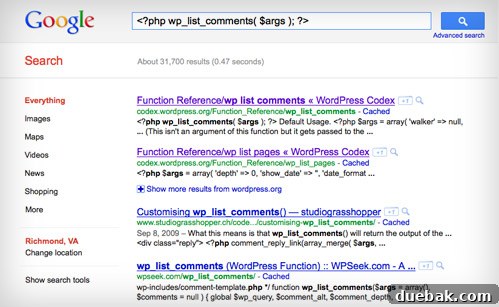
My overarching advice for any amateur venturing into coding and technical blogging remains consistent: embrace the philosophy of “change some code, and observe the outcome.” Sometimes, the most direct path to understanding a particular piece of code is to experiment with it, noting the precise consequences of your modifications. However, always ensure you back up the original code before making any changes. This safety net allows you to easily revert to the previous state if your adjustments yield unexpected or undesirable results. When I encounter a truly perplexing technical challenge, my immediate recourse is Google. Literally copying and pasting a mysterious error message or a specific snippet of code into the search bar often yields incredibly enlightening results. You’ll frequently discover solutions on message boards, support forums, and sometimes even find direct definitions or explanations of the problematic code.
For WordPress users, the platform itself is a treasure trove of information. Its official forums are a vibrant community for troubleshooting, and the WordPress Codex serves as an exhaustive, living encyclopedia detailing all of WordPress’s code, functions, and best practices, including valuable tips on how to safely modify them. This combination of hands-on experimentation, meticulous backup practices, and resourceful searching forms the bedrock of effective problem-solving in the dynamic world of web development. It fosters a mindset of continuous learning and empowers you to tackle complex issues with confidence, knowing that a solution is often just a search query away.
Enhancing Functionality: The Strategic Use of Plugins
Plugins are powerful add-ons that can significantly extend the functionality and customization options of your WordPress blog. Often available for free directly from your WordPress dashboard, they can introduce a wide array of features, from enhancing your sidebar with engaging widgets and expanding post capabilities to critically improving your site’s performance. A prime example is our highly-relied-upon W3 Total Cache plugin, which plays a pivotal role in preventing our site from crashing under heavy traffic by optimizing content delivery and caching. Other popular plugins include those for SEO (e.g., Yoast SEO), security (e.g., Wordfence), contact forms (e.g., Contact Form 7), and social sharing.
However, it’s crucial to exercise discretion when using plugins, as they are not without potential drawbacks. An excessive number of plugins, or poorly coded ones, can bog down your site, leading to slower loading times, conflicts, and even stability issues. We’ve experienced firsthand how a seemingly innocent polling plugin could overwhelm our site, causing it to crash four frustrating times in a single day. Whenever possible, and if you possess the necessary coding skills, hard-coding certain functionalities directly into your theme can be preferable to relying on a plugin, as it often results in cleaner code and better performance. However, for many common tasks, plugins offer an invaluable shortcut. The key is to be selective: prioritize essential plugins, thoroughly research their reviews and compatibility, and regularly update them. Learning to live with fewer, high-quality plugins that genuinely enhance your site’s core functions can help you avoid hair-pulling emergencies like inexplicable loading errors and full-blown site crashes.
When All Else Fails: Knowing When and Where to Get Help
At some point in your blogging journey, you will inevitably encounter a technical roadblock that leaves you stumped. This is a universal experience, regardless of one’s level of expertise. Therefore, cultivating a robust network of support resources is invaluable. These are my preferred avenues for seeking assistance:
- Google: As previously emphasized, Google is your first and often best line of defense. Specific error messages, code snippets, and feature descriptions make for highly effective search queries.
- Support Forums: Official forums, particularly those dedicated to WordPress, are excellent community-driven resources. While response times can vary, the collective wisdom often provides solutions or guidance.
- Technical Support: If you’re paying for a premium hosting service like LiquidWeb, leverage their technical support. We allocate a significant portion of our budget to them precisely because of their reputation for hands-on, expert customer service, especially for server-related issues.
- Twitter: The developer and blogging communities on Twitter are incredibly active. A concise, public cry for help, often accompanied by relevant hashtags, can quickly connect you with knowledgeable individuals willing to offer quick tips or point you in the right direction.
- Other Bloggers: Don’t hesitate to reach out to other bloggers whose sites you admire. If you see a feature or design element you like, politely inquire about how they achieved it. Sometimes, they might be willing to share a code snippet or explain their process, though more complex implementations might not be easily transferable.
- Paid Support: For critical or highly complex issues that exceed your capabilities or those of free resources, consider professional paid support. Services like WP Help Center offer dedicated assistance. In my own experience, I’ve occasionally hired local experts or friends when faced with truly baffling site crashes that defy all other troubleshooting efforts.
Concluding Thoughts: Embrace the Journey, Keep Learning
So, there you have it – a collection of insights gleaned from my personal experience in technical blogging. I sincerely hope this guide proves beneficial for those curious about the underlying mechanics of running a website. I’m certain there are countless specific questions I haven’t directly addressed, and my go-to response for many of them would likely remain, “try changing some code and see what happens, or simply Google it!” This approach, combined with the resources outlined, has been my most reliable method for navigating the complexities of web development.
Once again, if you are an expert in this field, please feel free to contribute your valuable advice and suggestions in the comments for others who are learning. Oh, and one quick question before you go: who else out there owned a truly fantastic Dilbert sweatshirt like mine? I know I can’t be the only one! And I trust you also seized the opportunity to pair it with stonewashed jeans and a bowl haircut, perfectly channeling that Ninth Grade John aesthetic. Happy blogging and happy coding!
Update: We frequently receive requests for more detailed information about professional blogging – how we built our site, cultivated our audience, and ultimately monetized our efforts. To address these inquiries comprehensively, we’ve shared all the specifics on how we successfully launched our blog, significantly grew our traffic, and transformed it into a full-time profession.