

Modernizing Your Garage: The Ultimate Guide to Universal Garage Door Remote Programming
In our modern lives, we constantly seek ways to simplify tasks and enhance daily conveniences. From smart thermostats to automated lighting, technology consistently offers solutions to minor frustrations we might not even realize we’re enduring. One such area, often overlooked, is the humble garage door remote. For many, it’s a small but constant source of minor inconvenience, clinging to outdated technology and clunky designs. This is a story about transforming that everyday annoyance into a seamless, satisfying experience – a journey into the surprisingly simple world of universal garage door remote programming, perfect for anyone who appreciates life’s little upgrades.
The Daily Frustration: When Old Remotes Fail to Deliver
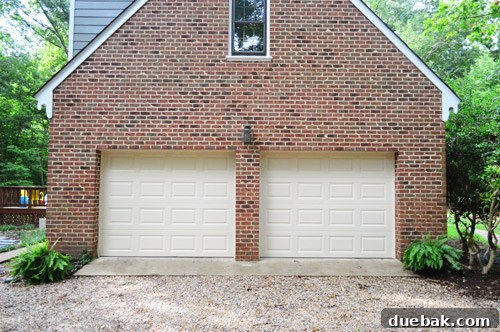
Like many homeowners, we inherited our garage door remotes from the previous occupants. While functional, they were far from ideal, embodying the very definition of “just barely getting by.” We have two garage doors, and each came with its own unique set of issues, contributing to a persistent, low-level irritation every time we pulled into the driveway.
The Finicky First Remote: A Visor Clip Conundrum
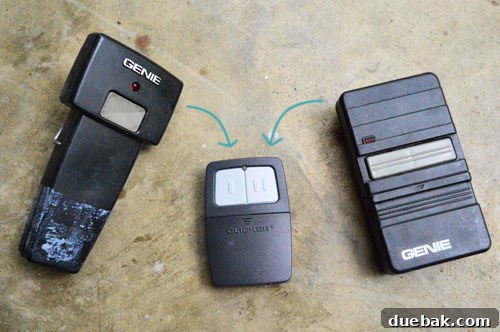
Our first remote was a temperamental beast. Initially, it barely worked, requiring multiple presses and specific angles to get a response. A quick battery replacement helped, almost too much, turning it into a hyper-sensitive device that would occasionally open or close the garage door with the slightest shift in my car’s cup holder. This wasn’t just annoying; it was a security concern, leaving the garage vulnerable to accidental openings. The root of its cup-holder residency? A glaring design oversight: it didn’t come with a visor clip. This meant no convenient, secure spot, forcing it into a precarious position where it was prone to accidental activation or getting lost amidst other car clutter. The simple act of reaching for a drink could inadvertently trigger the garage door, adding an unnecessary layer of stress to my daily commute.

The Duct-Taped Goliath: A Lesson in Inconvenience
The second remote offered a different, yet equally frustrating, set of challenges. While it worked more consistently than its counterpart, its physical condition was a testament to its age and heavy use. It required a creative, albeit unsightly, wrap of duct tape to keep its casing together and maintain functionality. Beyond its less-than-classy appearance, its monstrous size made it a truly inconvenient object. It simply didn’t fit anywhere neatly in our car – too big for the cup holder, too bulky for the sun visor, and prone to sliding around on the dashboard. This meant a constant hunt for the remote, often fumbling with it while trying to enter or exit the garage, especially in adverse weather or when in a hurry. The cumulative effect of these two problematic devices was a daily reminder that our garage door experience was ripe for an upgrade.

Discovering the Solution: The Clicker Universal Remote
Improving our garage door remote situation wasn’t exactly at the top of our home improvement priorities, but fate intervened during a routine trip to Home Depot. As I navigated the aisles, a display for a Clicker Universal Remote caught my eye. Priced at a reasonable $34, the prospect of consolidating two problematic, unsightly, and inconvenient remotes into one sleek, reliable, and “tape-free” device was an irresistible allure. It promised not just convenience, but also a subtle yet significant upgrade to the aesthetics and functionality of our car interior and daily routine. This wasn’t merely a purchase; it felt like an investment in daily peace of mind.
They say you only live once, right? And sometimes, that means splurging a little on a small gadget that promises to make a big difference in your everyday life. This “YOLO” moment (a phrase often quoted with humor in our house, especially for justifying small indulgences) felt entirely appropriate for this particular purchase. Little did I know, this seemingly simple device would unlock a new level of garage door convenience.
Demystifying Garage Door Opener Programming: Understanding Dip Switches
My enthusiasm for the new Clicker universal garage door remote was slightly tempered by an immediate realization: I hadn’t paused to consider the actual programming process. My knowledge of garage door mechanics was virtually non-existent, and the instruction manual’s mention of “dip switches” immediately conjured images of complex wiring and potential frustration. But with the promise of a simplified life, I was determined to tackle this DIY challenge head-on.
What are Dip Switches and How Do They Work?
Before diving into the programming, it was crucial to understand what these “dip switches” actually were. A quick consultation with my trusted “little bird” (aka Google) revealed their purpose. Dip switches are a series of tiny, toggle-like switches, typically 9 or 12 in number, located either inside your existing garage door remote control or directly on the garage door opener unit itself. These switches can be set in an “up,” “down,” or sometimes “middle” position, creating a unique binary code or “fingerprint” for your specific garage door opener. This sequence acts as a security measure, ensuring that only a remote with the matching code can activate your garage door. To successfully program a new universal remote, you simply need to replicate this exact sequence of ups and downs.
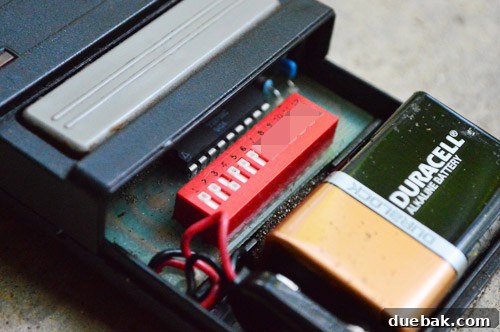
Finding these switches is usually straightforward. For older remotes, you might need to unscrew a small panel on the back or slide open a compartment to reveal them. On the garage door opener unit itself (the box mounted to the ceiling), look for a small panel or cover. Once located, carefully observe the sequence – paying close attention to which switches are up and which are down is the critical first step in achieving successful programming. The image above shows the partially-obscured dip switches inside one of our old remotes, providing the crucial code I needed to replicate.
Preparing Your New Clicker Universal Remote
With a clear understanding of dip switches, the next step was to prepare the new Clicker universal remote for programming. This involved opening its casing to access its internal set of dip switches, ready to be configured. The Clicker remote is designed for user-friendliness, so accessing these switches was simple and required no special tools beyond a small screwdriver or a coin to pry open the battery compartment or a designated access panel.
Step-by-Step: Programming Your Universal Garage Door Remote
The actual programming of the Clicker universal remote turned out to be incredibly straightforward, a testament to its user-friendly design. Here’s how I tackled it:
Step 1: Identify Your Existing Code. The first crucial step was to meticulously observe the sequence of the dip switches on my existing garage door remote (or the opener unit, if I hadn’t had the old remote). I carefully noted which of the 9 (or 12) tiny switches were in the ‘up’ position and which were in the ‘down’ position. Precision here is key, as even one incorrect switch can prevent successful pairing.
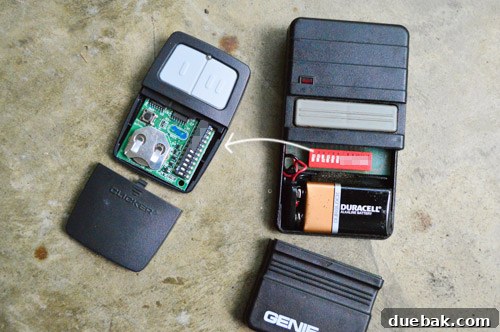
Step 2: Set the Dip Switches on Your New Remote. Once I had the code, I used the tip of a small screwdriver to precisely move each switch on the new Clicker remote into the correct ‘up’ or ‘down’ position, mirroring the sequence I had just identified. It was like solving a miniature puzzle, ensuring every switch matched its corresponding position from the original. Note: In the accompanying photo, the last 5 dip switches hadn’t yet been moved to reflect our specific code, but the process remained the same for all of them.

Step 3: Syncing with Your Garage Door Opener. After setting the dip switches, the final step was to pair the remote with the garage door opener. The Clicker remote allows you to assign different buttons to different doors. I simply pressed and held the desired button (the one I wanted to assign to that particular garage door) until the garage door responded by moving. This “learning” process is remarkably quick; usually, a single press or a short hold is enough for the opener to recognize its new remote’s signal.
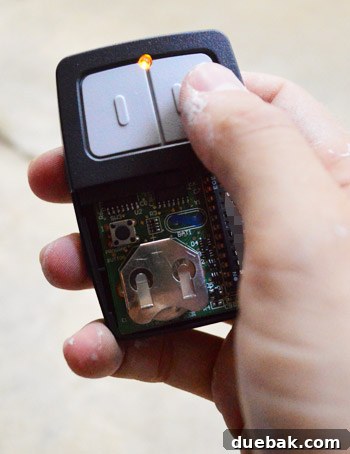
Programming Multiple Doors: The beauty of a universal remote like the Clicker is its ability to control multiple garage doors independently. After programming the first door, I simply repeated the entire process for the second door. This involved identifying the dip switch code for the second door (which was different from the first), setting the Clicker’s dip switches to match that new code, and then assigning a *different* button on the Clicker remote to the second door. Crucially, changing the dip switches for the second door did not undo the programming for the first door. Within about 10 minutes, I had successfully programmed both doors, transforming a pair of cumbersome remotes into one sleek, dual-door-operating device. Hallelujah!
The Transformative Power of a Simple Upgrade: Enjoying Modern Convenience
The entire programming process was shockingly easy. I expected some level of technical frustration, perhaps a call to customer support or a deep dive into online forums, but the Clicker universal remote proved to be remarkably intuitive. Within roughly ten minutes, both garage doors were perfectly synced with my new, single remote. The efficiency was truly impressive. And the feeling of accomplishment? That was the icing on the cake. This wasn’t just a tech update; it was a win for convenience and a testament to the fact that intimidating-looking tasks can often be quite simple.
I simply had to spread the word about this easy tech update. If I, someone with admittedly limited garage door knowledge, could navigate this process with such ease, then truly anyone can do it. Heck, I think even our family dog, Burger, might be able to figure it out!
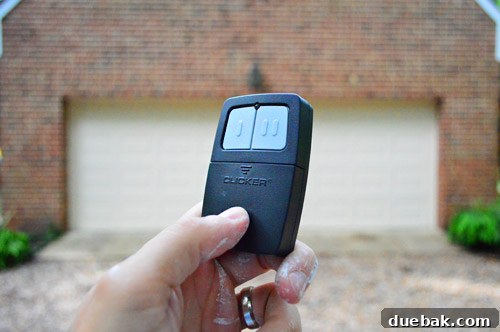
In summary, I might just be a remote addict (remember these universal TV remotes?). But the sheer satisfaction derived from this small upgrade is undeniable. The ultimate advantage? The Clicker universal remote came equipped with a sturdy visor clip. This seemingly minor detail was a game-changer, allowing me to finally hang my garage door opener in a truly convenient and accessible spot on my car’s visor. No more fumbling in the cup holder, no more accidental presses, just smooth, instant access. Yup, you can call me big poppa of garage door convenience!
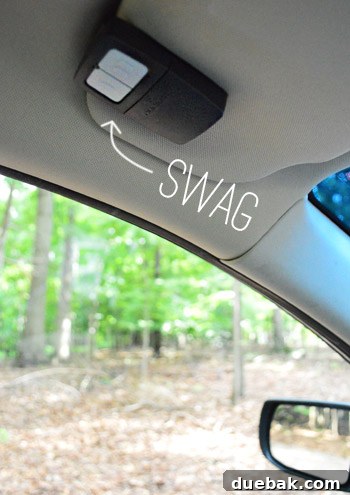
It’s amazing how much enthusiasm a tiny technological upgrade can spark. My wife, Sherry, initially couldn’t quite fathom my excitement for this new remote, no matter how many times I brought it up. But for me, the relief of being rid of those big, ugly, duct-tape-covered, cup-holder-hogging relics of the past is immense. This isn’t just about opening a garage door; it’s about reclaiming a little bit of daily peace and order.
Welcome to the future of garage door convenience, guys. It’s nice here, and it’s surprisingly easy to get to.