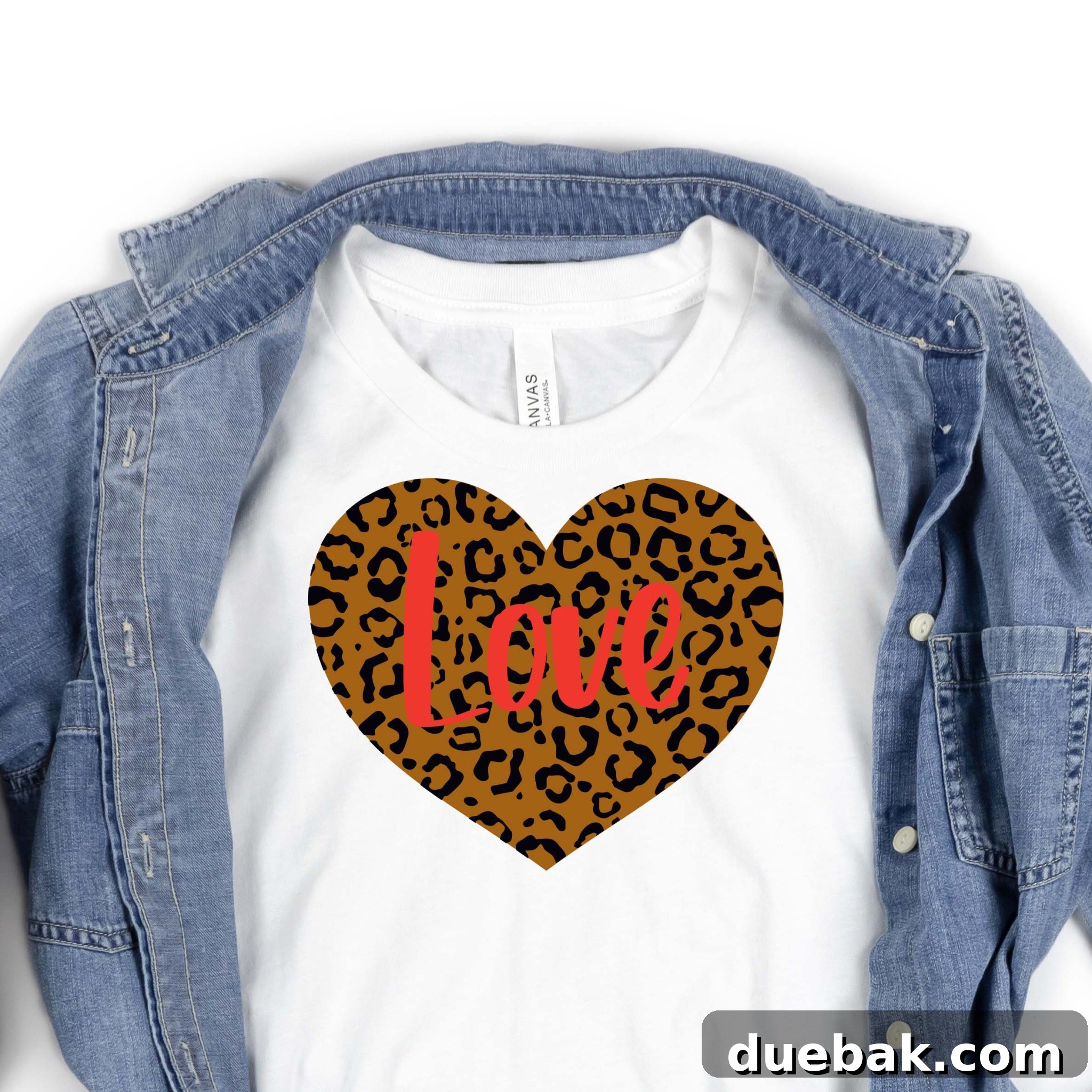
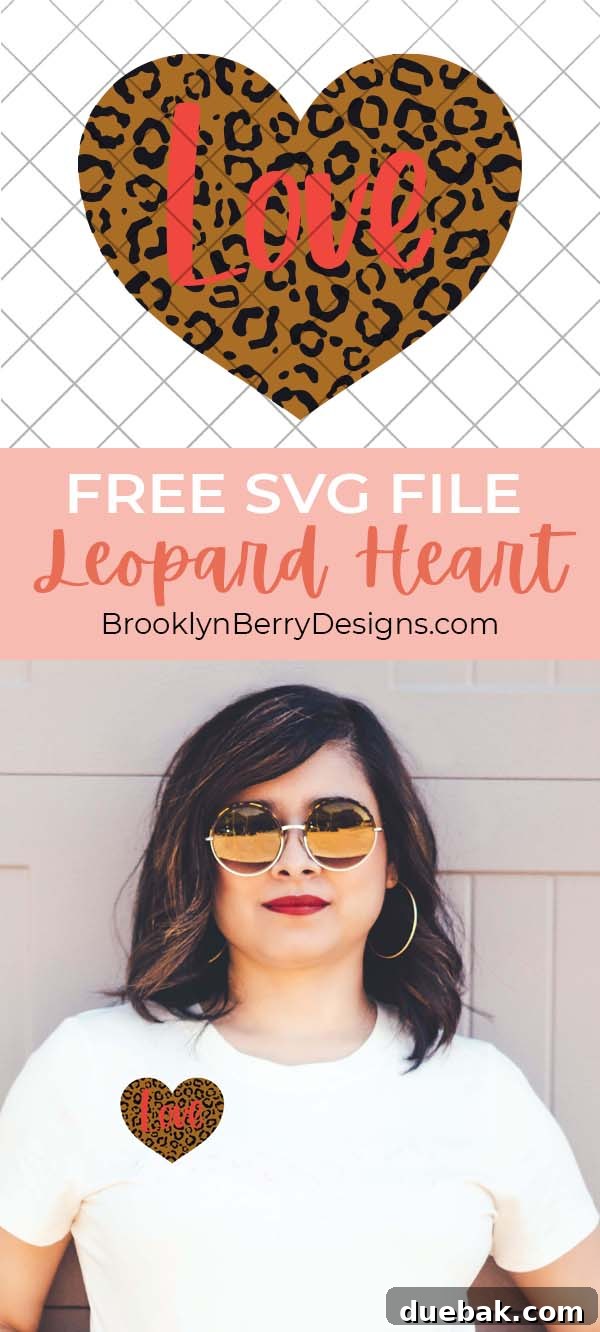
Transform your Valentine’s Day crafting with our exclusive Free Leopard Print Heart SVG! This versatile design is perfect for creating custom shirts, heartfelt cards, unique home decor, and so much more. Simply upload it to Cricut Design Space or your preferred cutting machine software and start crafting your personalized projects today!
Unleash Your Creativity with Our Free Leopard Print Heart SVG
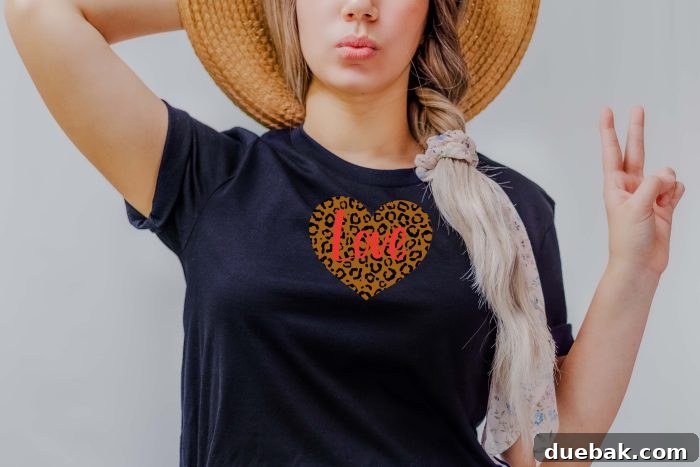
Leopard print and cheetah print styles are more than just a passing trend; they’re a timeless fashion statement that consistently brings a touch of wild elegance to any design. While these patterns are a year-round favorite, their appearance in Valentine’s Day decor and apparel adds a uniquely chic and playful twist to the season of love. Imagine celebrating Valentine’s Day with a custom-made shirt featuring a striking leopard print heart, adorned with a beautifully handwritten “LOVE” message. This inspired design combines classic style with a romantic sentiment, making it an absolute must-have for your crafting collection.
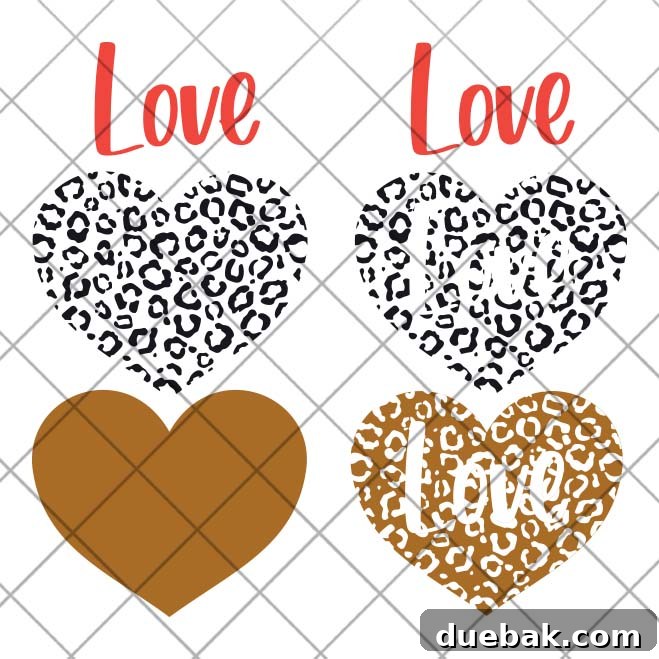
We’ve meticulously designed this Leopard Print Heart SVG to offer maximum flexibility for your creative projects. It comes in two distinct formats, each catering to different crafting preferences and techniques:
- Layered Format: This version provides separate, complete layers for the base heart, the leopard spots, and the “LOVE” text. This allows for easy stacking and precise alignment, making it ideal for multi-color designs where you want each element to stand out with its own distinct color of vinyl. This format offers greater depth and visual interest to your finished project.
- Knock-Out (Cut-Out) Format: In this innovative format, the leopard print pattern and the “LOVE” text are cut directly out from the base heart shape. This means you can use a single color of vinyl for the heart, and the leopard pattern and text will appear as cut-outs, revealing the fabric underneath or a contrasting layer beneath the heart. This method is fantastic for a sleek, integrated look and can simplify the application process, especially for those new to multi-layered designs.
Understanding these options empowers you to choose the perfect format for your specific vision, whether you’re aiming for a vibrant, layered masterpiece or a sophisticated, cut-out design.
Customize Your Valentine’s Look: Endless Color Possibilities with Iron-On Vinyl
One of the most exciting aspects of working with iron-on vinyl (HTV) is the freedom it gives you to customize your projects with virtually any color combination imaginable. While classic black and brown leopard prints are undeniably stylish, why not explore a more festive palette for Valentine’s Day? Imagine your Leopard Print Heart SVG in a dazzling glitter pink, a romantic deep red, or even a sophisticated rose gold. The possibilities are truly endless!
Don’t limit yourself to traditional colors. Feel free to experiment with bold contrasts or subtle ombrés. You could use a shimmering gold for the leopard spots against a velvety red heart, or perhaps a pastel pink heart with white leopard details for a softer, whimsical touch. This project is your canvas, and the wide array of HTV colors available means you can perfectly match any aesthetic or personal preference. Switch out any colors to get the combination that truly speaks to your heart and makes your custom creation uniquely yours.
Discover More Inspiring DIY Projects from Brooklyn Berry Designs
Our passion for creative crafting extends beyond just SVG files! We believe in empowering you with the tools and inspiration to make beautiful, personalized items for every occasion. If you enjoyed this free Leopard Print Heart SVG, you’ll love exploring our other popular projects and free downloads. Each one is designed to spark your imagination and guide you through fun, achievable DIY endeavors. Check out some of our recent favorites:
- Easter Word Search Printable (Free PDF Download!)
- DIY Leather Journal Cover Tutorial (Cricut-Friendly & Reusable!)
- Free Printable Birthday Cake Banner (Perfect for Cakes & Cupcakes!)
- Free Printable Birthday Calendar (Perpetual & Easy to Use!)
- Easy Spider Treats for Halloween | Quick Simple Recipe
Essential Supplies for Crafting Your Leopard Print Heart Shirt
To embark on your custom Valentine’s shirt project, gathering the right tools is the first step to success. Here’s a detailed list of what you’ll need, along with why each item is crucial for achieving a professional finish:
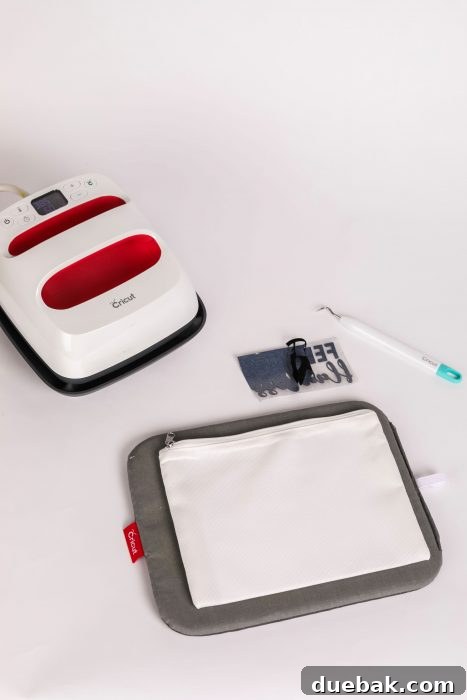
- Cricut Joy (or any other vinyl cutting machine like a Cricut Explore Air 2, Maker, or Silhouette Cameo): This is your primary tool for precisely cutting the SVG design from your iron-on vinyl. While the Cricut Joy is compact and perfect for smaller projects, any larger Cricut or compatible vinyl cutter will work beautifully.
- Iron-on Vinyl (HTV): This special type of vinyl adheres to fabric when heat is applied. You’ll need different colors depending on your chosen design format (layered or knock-out). We recommend high-quality HTV from reputable brands like Cricut or Expressions Vinyl for durability and vibrant results.
- Cricut EasyPress (or a traditional iron/heat press): An EasyPress ensures even heat distribution and precise temperature control, which is critical for HTV to adhere properly and last longer. While a household iron can work, an EasyPress provides superior, consistent results.
- EasyPress Mat: This mat provides a firm, even surface for pressing, helping to transfer heat efficiently and protect your work surface from heat damage. It’s designed to draw moisture away, which is ideal for HTV application.
- Weeding Tools: Essential for removing excess vinyl from around your cut design. A weeding hook or pick allows for precise and easy removal of small details, ensuring a clean transfer.
- Blank T-shirt or Garment: Choose a clean, pre-washed shirt made from cotton, polyester, or a cotton-poly blend for best results with HTV.
- Parchment Paper or Teflon Sheet: Used as a protective barrier between your heat press and the vinyl, especially when pressing multiple layers or to prevent scorching.
Step-by-Step Guide: Crafting Your Valentine Shirt with the Leopard Heart SVG
1. Getting Started: Uploading Your SVG to Cricut Design Space
The first step in bringing your custom design to life is to upload the Leopard Print Heart SVG file into your cutting machine’s software, such as Cricut Design Space. If you’re new to this process or need a refresher, we’ve got you covered! You can find a comprehensive, step-by-step guide on How To Upload An SVG file into Cricut Design Space that will walk you through every detail, ensuring a smooth start to your project.
2. Preparing Your Design: Sizing and Layering Techniques
Once your design is uploaded, the next crucial step is to size it appropriately for your shirt. Consider the placement carefully: a larger design centered prominently on the chest creates a bold statement, while a smaller version placed on the shoulder or near the collar can offer a subtly adorable touch. Measure your shirt and the desired placement area to get the perfect dimensions.
If you’re using the layered option of our SVG, we highly recommend adding small alignment marks (like tiny squares or circles) to each layer in Design Space. These marks will cut with your vinyl and serve as invaluable guides when you’re positioning and pressing your layers onto the shirt, ensuring perfect registration and a professional-looking finish.
3. Cutting Your Vinyl: Mirroring and Material Settings
Before sending your design to your Cricut machine, remember these critical steps for iron-on vinyl:
- Mirror Your Design: Always activate the “Mirror” option in Design Space for HTV. Because you apply HTV face-down, mirroring ensures that your design will appear correctly oriented once it’s pressed onto the fabric. Forgetting this step is a common mistake that can waste material!
- Shiny Side Down: Place your iron-on vinyl shiny side (carrier sheet) down onto your cutting mat. The duller, adhesive side should be facing up towards the blade.
- Select Material Settings: Next, you will select the material being cut (iron-on vinyl) on your machine. The exact setting will vary depending on your specific Cricut model (e.g., “Iron-On,” “Everyday Iron-On,” “Glitter Iron-On”). Always follow the recommended settings for the type of HTV you are using to ensure a clean cut without damaging the material or your blade.
4. The Art of Weeding and Precision Placement
After your machine has finished cutting, carefully remove the vinyl from your cutting mat. Now comes the “weeding” process: this involves removing all the excess vinyl material from around your design, leaving only the parts you want to transfer to your shirt on the clear carrier sheet. Use your weeding tools to meticulously peel away the unwanted sections, paying close attention to small details and inner cuts within letters or shapes.
Once weeded, it’s time for placement. Lay your shirt flat on your EasyPress Mat. Arrange the design onto the shirt, one layer at a time, making sure it is perfectly aligned where you like it. For the layered Leopard Print Heart SVG, you will typically start with the largest base layer (the heart shape), then carefully position the leopard spots, and finally, the “LOVE” letters. Before pressing any subsequent layers, remember to cover your design with parchment paper or a protective Teflon sheet. This is crucial to protect the previously pressed vinyl layers from direct heat and potential scorching.
5. Flawless Application: Heat Pressing Your Design
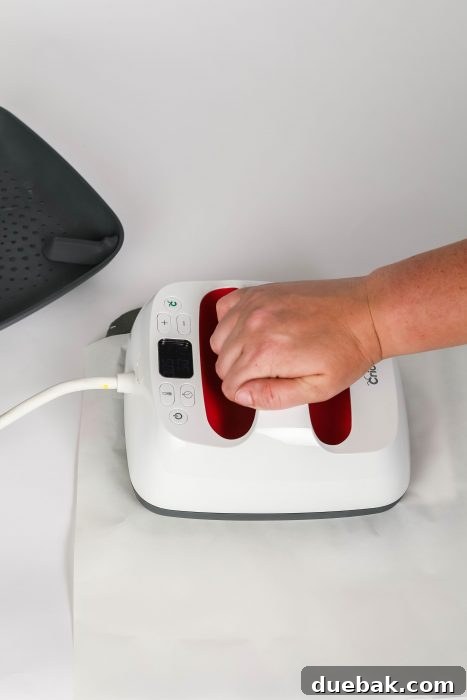
Finally, turn on your Cricut EasyPress (or heat press) and set it to the precise time and temperature recommended for your specific type of iron-on vinyl. The Cricut Heat Guide is an invaluable resource for finding these exact settings. Place your EasyPress directly over the design, applying firm, even pressure for the recommended duration. For multi-layered designs, press each layer individually for a shorter time (e.g., 5-10 seconds) to “tack” it down, then do a full press on the final layer for the recommended time to ensure all layers are fully adhered. After pressing, allow the vinyl to cool slightly before gently peeling back the carrier sheet (refer to your vinyl instructions for warm peel vs. cold peel recommendations).
Caring for Your Custom HTV Apparel
To ensure your beautiful custom Leopard Print Heart shirt lasts for many Valentine’s Days to come, proper care is essential. Wait at least 24 hours after pressing before washing the garment. When washing, turn the shirt inside out, use cold water, and select a gentle cycle. Avoid using harsh detergents, bleach, or fabric softeners, as these can degrade the vinyl. Tumble dry on low heat or, ideally, hang to dry. Never iron directly over the vinyl design; if ironing is necessary, turn the garment inside out or place parchment paper over the design.
Beyond Shirts: Creative Uses for Your Leopard Print Heart SVG
While this Leopard Print Heart SVG is absolutely perfect for t-shirts, its versatility extends far beyond! Consider these other creative ways to use your free download:
- Tote Bags: Personalize a canvas tote for a stylish and practical accessory.
- Greeting Cards: Use cardstock and your Cricut to create stunning, dimensional Valentine’s Day cards.
- Home Decor: Apply the design to a wooden sign, throw pillow cover, or even a ceramic mug (with permanent vinyl, not HTV).
- Kids’ Crafts: Let your little ones join the fun by cutting out paper versions for collages or decorations.
- Accessories: Add a chic touch to headbands, cosmetic bags, or even pet bandanas.
Troubleshooting Common Cricut & HTV Issues
Even experienced crafters encounter a snag now and then. Here are quick tips for common issues:
- Vinyl Not Sticking: Ensure your heat press temperature is correct and you’re applying firm, even pressure for the recommended time. Pre-pressing your fabric for a few seconds can also help remove moisture.
- Bubbles or Wrinkles: Make sure your fabric is flat and taut before pressing. If bubbles appear after pressing, a quick re-press with protective paper might help.
- Vinyl Peeling Up: Check if it’s a warm peel or cold peel vinyl. If it’s a cold peel, let it cool completely. If it continues to peel, try another short press.
- Scorching Fabric: Always use a protective sheet (parchment or Teflon) when pressing, especially for multiple layers or delicate fabrics. Verify your heat settings are appropriate for both the vinyl and the fabric.
Download Your Free Leopard Print Heart SVG Today!
Ready to infuse your Valentine’s Day with a touch of wild romance and handmade charm? This beautiful Leopard Print Heart SVG is available for you to download completely FREE!
This versatile file is Cricut File #4 in our exclusive Freebie Library! Access a treasure trove of free SVG files and printables by signing up for our email list in the form below. If you’re already a subscriber and have the password, simply head over to the Freebie Library now to download this fantastic file and start your next project!
Please Note: All free downloads from Brooklyn Berry Designs are intended for PERSONAL and CLASSROOM USE ONLY. You MAY NOT share, distribute, sell, or use these files for any commercial purposes, including print-on-demand services. Commercial licenses for our SVG and PNG Crafting Files may be available for purchase separately. Thank you for respecting our terms of use and supporting independent designers!