
A Digital Declutter: Revamping Our Project Gallery for Enhanced User Experience and SEO
In the dynamic world of online content, maintaining a well-organized digital space is as crucial as keeping your physical surroundings tidy. Just as you might tackle a mountain of paperwork or declutter your desktop, an efficient website requires regular streamlining. For us, this week marked a significant milestone in our ongoing organizational efforts: a comprehensive overhaul of our blog’s “Projects” page. This isn’t just about aesthetics; it’s about making our vast archive of DIY and home improvement content more accessible, enjoyable, and discoverable for you, our valued readers.
The Challenge: A Project Page Overrun by Text
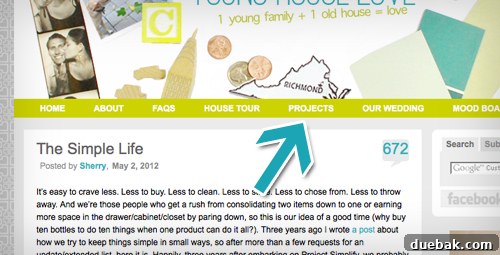
For years, our Projects page served as the central hub for all our creations, an attempt to categorize and present our myriad project posts. It lived prominently under our blog header, a go-to destination for anyone seeking inspiration or a specific DIY guide. Our initial system was straightforward: a simple list of linked descriptions for each project, sorted into various categories. This method worked adequately in the early days when our project count was modest, perhaps a few dozen entries.
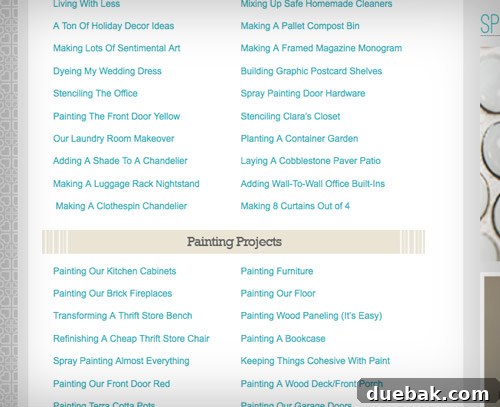
However, as our blog grew exponentially over the years, so did our project tally. What was once a manageable list gradually transformed into an overwhelming “sea of text.” The sheer volume became an obstacle rather than an aid. We last counted over 750 links on that single page, a figure that included some duplicates where projects naturally fit into multiple categories. To make matters worse, the page hadn’t been updated in months, meaning that by our best estimate, we were on track to hit 1,000 links once five more months of content were added. This chaotic structure not only made navigation difficult but also presented a significant hurdle for new visitors trying to explore our extensive archives. It was clear that a radical change was desperately needed to restore order and enhance usability.
Setting Our Sights: Goals for a Revitalized Project Gallery
With the understanding that our project gallery had become cumbersome, we embarked on a multi-week overhaul with two primary, interconnected goals in mind:
- Pare Down: Simplify the overall structure by consolidating categories and eliminating redundancies without losing any valuable content.
- Enhance Browsability: Transform the user experience, making it intuitive and visually engaging, akin to casually perusing a well-organized bookstore.
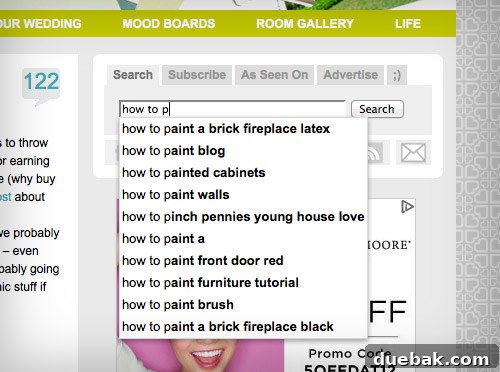
We specifically aimed for a “browsing” experience. Think of it like walking into your favorite bookstore: you head to a section that piques your interest and let a title or cover catch your eye. If you’re searching for something highly specific, our site’s search bar remains your best bet, acting as a dedicated “information desk.” However, with the significant upgrades we’ve implemented, even a casual stroll through our revamped project pages promises discovery and inspiration, now made infinitely more pleasant and efficient. This focus on intuitive navigation and visual appeal was paramount to creating a truly user-friendly resource.
The Transformation: Bringing Our Projects to Life Visually
Streamlining Categories: Less is More
The initial phase of our overhaul focused on simplification. We meticulously reviewed all 26 existing project categories and, through careful consideration, condensed them into a more manageable 16. This strategic reduction allowed us to eliminate a significant number of duplicate project listings, where a single project might have appeared in several overlapping categories. Crucially, this consolidation was achieved without removing any actual project posts, ensuring that all our valuable content remained accessible. The benefit was immediate: clearer focus for each category and a less overwhelming choice for our readers. This refined categorization not only aids navigation but also helps search engines better understand and index our content, boosting its overall visibility.
The Power of Visuals: Introducing Project Thumbnails
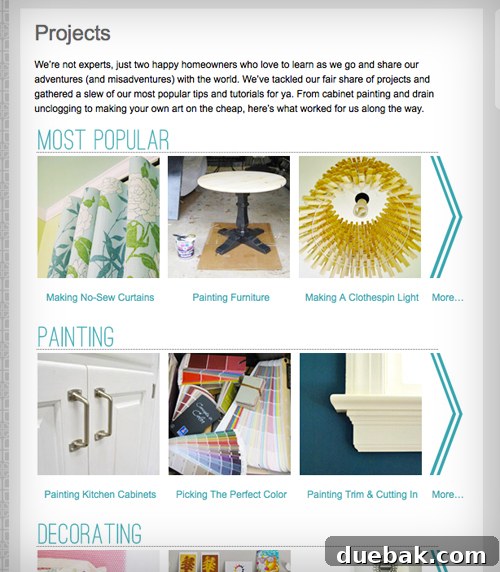
While paring down categories addressed the structural clutter, the true game-changer for browsability was the introduction of visual elements. To revisit our bookstore metaphor, we essentially gave all of our projects a compelling “cover,” making them instantly more appealing and easier to identify.
Adding photo thumbnails for each project, and giving each category its own dedicated page, had been on our minds for a long time. We’ve always admired other blogs, like Kate’s, Stephanie’s, and Layla’s, which feature beautiful, glossy project galleries. However, the sheer scale of the task—relinking everything and creating and coding over 600 individual thumbnails—was daunting. It required a monumental effort, involving countless “man hours” and “woman hours” behind the scenes. We explored various plugins to automate the process, but due to the specifics of our blog’s template and the unique structure of our categories, we ultimately discovered that the only viable solution was to hard code each thumbnail by hand. It was an exhaustive, painstaking process, demanding precision and dedication, but now that it’s complete, and the memory of endless lines of code no longer haunts our waking (or sleeping) eyes, we can confidently say it was entirely worth every minute.
The addition of an image to each project entry dramatically transforms the browsing experience. Scrolling through categories is now significantly easier on the eyes, reducing visual fatigue and making it quicker for you to identify and focus on the types of projects that truly capture your interest. Beyond the practical benefits, there’s an undeniable aesthetic appeal: pictures are inherently more engaging and inviting than mere text, turning each category page into a visually rich source of inspiration. This visual upgrade not only improves user engagement but also provides valuable visual cues for search engines, helping them better understand the content of each project.
Navigating the New & Improved Project Hub
The new structure is designed for maximum clarity and ease of use. You’ll find one main projects page that acts as an overview, showcasing a few representative thumbnails from each of our 16 main categories. This provides an immediate visual summary of what each section entails. From there, you can simply click “more” or directly on a category’s title to access an entire page dedicated to that specific category. This granular approach ensures that whether you’re looking for broad inspiration or a niche project, you can quickly dive into relevant content. Each category page is now a self-contained gallery, offering a focused and immersive browsing experience.
Our carefully curated 16 categories include:
- Most Popular Projects
- Painting Projects
- Decorating Ideas
- Furniture Upgrades & Building
- Crafting & Art
- Home Improvement Guides
- Outdoor & Exterior Projects
- Cleaning, Organizing & Eco-Friendly
- Love & Marriage / Relationship Topics
- Money Saving & Budget DIYs
- Kids & Pets Related Projects
- Holiday & Entertaining Ideas
- Video Tutorials
- Projects By Month Archives
Our Ongoing Commitment: Keeping Things Fresh
Our commitment to an organized and user-friendly project gallery doesn’t end with this redesign. We plan to regularly update these pages every few weeks, ensuring that the latest projects we’ve tackled are promptly added and the content remains current. For instance, the recent organization-related posts from this week will be incorporated along with new content in the coming weeks. This continuous updating ensures the gallery remains a vibrant and relevant resource for all your DIY needs, providing fresh inspiration with every visit.
The order of projects within each category page is a thoughtful blend of strategy and serendipity. While we’ve intentionally placed some of our most popular and favorite projects towards the top to maximize visibility, we also embraced a degree of “random-ocity” to ensure a diverse display. Logical groupings, such as lumping all our kitchen and bathroom remodeling projects together, are also in place to aid navigation. Our aim was to avoid having all the oldest projects relegated to the very bottom, creating a mixed bag that offers a fresh discovery with every visit. It truly is like a well-stocked bookstore; you can simply pull a “book” off the shelf (or click a thumbnail), check out its “cover,” and decide if you want to flip it open and explore further.
Your Turn: Tackle Your Own Organization Goals
We sincerely hope you appreciate this significant revamp of our project gallery. It was a labor of love, driven by our desire to provide you with the best possible browsing experience. With this monumental task now complete, our focus shifts to the next big organizational challenge on our personal to-do list (the infamous basement, perhaps!). We’ll share more about that journey in upcoming posts.
In the meantime, we’d love to hear from you! What paper or tech organization projects have you tackled recently? Do you have any invaluable tips or tricks to share with our community? Or are you gearing up to conquer a new organizational challenge tonight? Share your thoughts and experiences in the comments below!
Psst- If you’re looking for more traditional organizing and decluttering advice, don’t miss our newly organized Cleaning & Organizing page. It’s packed with over 50 posts dedicated to bringing order and efficiency to your home and life. How’s that for being meta and helpful?