Elevate your Pinterest presence and drive more traffic to your site by mastering the art of font selection for your graphics. Discover my top font recommendations and learn where to source them, including a curated list of the 10 best script fonts perfect for eye-catching pins.
In the vast digital landscape, Pinterest stands out as an indispensable platform for content creators and businesses aiming to significantly boost website traffic. As a powerful visual search engine, Pinterest relies heavily on compelling graphics to capture user attention and encourage clicks. However, merely having an image isn’t enough; your pins need to be meticulously designed to be truly eye-catching and effective.
Through extensive observation and analysis, it has become abundantly clear that images incorporating clear, engaging text consistently outperform those without. Text overlays on your Pinterest graphics serve a crucial purpose: they provide immediate context and a clear value proposition to potential visitors. By explicitly stating what a reader can expect upon clicking a pin and navigating to your site, you enhance user experience, reduce bounce rates, and ultimately, drive more qualified traffic.
Crafting Irresistible Pinterest Pins: The Power of Typography
Your Pinterest graphics are often the first impression users have of your content and brand. Beyond captivating imagery, the fonts you choose play a pivotal role in conveying your message, establishing your brand’s personality, and compelling users to engage. Effective typography ensures your pins are not just seen, but understood and remembered.
The strategic use of fonts allows you to:
- **Communicate Instantly:** Text quickly clarifies the topic, benefit, or call to action of your pin.
- **Build Brand Recognition:** Consistent font choices across your pins help solidify your visual identity.
- **Create Visual Hierarchy:** Different fonts, sizes, and weights guide the eye to the most important information.
- **Evoke Emotion:** Fonts carry inherent personalities, from elegant and sophisticated to playful and bold, influencing how your content is perceived.
Fonts as Brand Ambassadors: Setting Your Content Apart
Given the highly visual nature of Pinterest, your font selections are far more than mere decorative elements; they are essential components of your brand identity. To truly distinguish your pins from the countless others, you need to cultivate a unique and consistent visual style. A highly recommended practice is to create a comprehensive brand board for your site. This board should clearly outline your chosen brand fonts (typically two), precise brand colors with their corresponding hex codes, and any other visual details that ensure unwavering consistency across all your content.
When curating your brand’s typography, it’s wise to include a versatile pair: often a sophisticated script font for expressive headlines and a clean, legible sans-serif font for supporting text. This combination offers both aesthetic appeal and practical readability, forming the cornerstone of your visual communication strategy on Pinterest and beyond.
Understanding Font Categories for Pinterest Success
To make informed font choices, it’s helpful to understand the main font categories and their typical applications:
- **Serif Fonts:** Characterized by small lines (serifs) at the end of strokes (e.g., Times New Roman, Georgia). They convey tradition, authority, and elegance, often used for classic or formal brands.
- **Sans-serif Fonts:** “Sans” means “without,” so these fonts lack serifs (e.g., Arial, Helvetica, Montserrat). They are modern, clean, and highly readable, making them excellent choices for body text and digital displays, including Pinterest pins.
- **Script Fonts:** Mimic handwriting or calligraphy (e.g., great for titles or branding elements). They exude personality, elegance, or playfulness but must be used carefully to maintain readability, especially on smaller screens.
- **Display Fonts:** Designed for large headings and short bursts of text, often with unique or decorative elements. They are perfect for grabbing attention but are usually too elaborate for extended reading.
- **Handwritten Fonts:** A subcategory of script, often less formal and more organic, reflecting a personal or crafty touch.
For Pinterest, a common and effective strategy involves pairing a distinctive script or display font for the primary headline with a highly legible sans-serif font for secondary information. This creates visual interest while ensuring your message is quickly understood.
Sourcing Exceptional Fonts: Beyond the Obvious Choices
Finding unique and high-quality fonts that haven’t been overused by everyone else can feel like a quest, but there are fantastic resources available. One of my go-to platforms is Font Bundles, which consistently offers an impressive selection of freebie fonts, with new additions frequently appearing. Another excellent resource is Creative Fabrica, which also boasts an entire dedicated page of free fonts.
Navigating Font Licenses: A Crucial Consideration
For anyone who sells products, whether digital or physical, understanding font licensing is absolutely paramount. The fonts available on platforms like Font Bundles and Creative Fabrica are particularly appealing because they often include a commercial license, granting you the freedom to use them in any way you wish for profit. This peace of mind is invaluable, protecting you from potential legal issues down the line.
It is imperative to meticulously review the license information for every font you intend to use, especially if it’s for commercial purposes. A common pitfall for many creators is inadvertently using a “personal use only” font in a product they sell or on their monetized blog. Such a mistake could lead to significant problems and even legal disputes in the future. This is precisely why I prioritize purchasing or downloading fonts from reputable sites that provide transparent and clearly listed license information, ensuring I can use my chosen fonts on my blog, in images, or on products without any concern.
Many “free fonts” found scattered across the internet are often designated for personal use only. While they may offer a tempting free option, they frequently require a separate purchase for a commercial license. This is another reason why I appreciate Font Bundles; their free and paid fonts consistently come with commercial licenses built-in. Beyond their weekly free font offerings, they also present incredible bundles and periodic “$1 deals,” making high-quality, legally compliant typography accessible to everyone.
Seamless Font Installation and Management
Once you’ve acquired your desired fonts, the next step is installing them on your computer. Most fonts come in .OTF (OpenType Font) or .TTF (TrueType Font) formats. Installation is typically straightforward:
- **Windows:** Right-click the font file and select “Install.”
- **Mac:** Double-click the font file and click “Install Font” in the pop-up window.
For designers with many fonts, a font manager application can be invaluable. These tools help organize, activate, and deactivate fonts, preventing system slowdowns and making it easy to find the perfect typeface for your next Pinterest graphic.
The Art of Font Pairing: Creating Visual Harmony
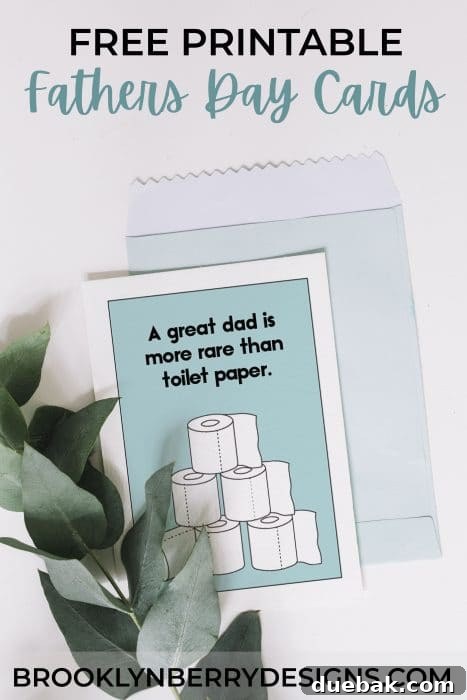
One of the secrets to truly outstanding Pinterest graphics lies in the art of font pairing. You’ll frequently observe a successful pattern where a more delicate or thinner script font is harmoniously paired with a bold, simple sans-serif font. This dynamic combination creates immediate visual interest, drawing the viewer’s eye and significantly increasing the likelihood of a click on your pin image.
Key Principles for Effective Font Pairing:
- **Contrast is Key:** Aim for clear differentiation in style, weight, or size. A decorative script font often pairs beautifully with a clean, minimalist sans-serif.
- **Establish Hierarchy:** Use different fonts or sizes to indicate the importance of information. Your main headline should stand out, while supporting text provides detail.
- **Maintain Readability:** While aesthetics are important, readability is paramount, especially on small screens where pins are often viewed. Avoid pairing two highly decorative fonts that compete for attention.
- **Limit Your Choices:** Stick to a maximum of two, or perhaps three, complementary fonts per graphic. Too many fonts can make a design look cluttered and unprofessional.
- **Consider Your Brand’s Personality:** Ensure your chosen font pairs reflect the overall tone and message of your brand.
Beyond font pairing, judicious use of color in your text can further enhance your designs. Strive to limit your pin designs to a maximum of two colors in total for optimal impact and brand consistency. Typically, one font will be rendered in a neutral shade like black or white (chosen based on the background image’s colors for maximum contrast), while an accent color, preferably one of your established brand colors, is used for emphasis or to highlight key phrases. This intentional use of color strengthens brand recognition and guides the viewer’s eye.
A valuable tip before committing to a purchase: most reputable font listing pages offer a preview feature. Simply scroll down to find a section where you can type in your own custom text and see how it renders in that specific font. This allows you to test out headlines or phrases crucial to your brand before making a decision.
For those who love crafting, are you searching for exceptional fonts to use in Cricut Design Space? Explore my top recommendations and grab a handy printable cheat sheet!
Top 10 Script Fonts for Stunning Pinterest Pins
To give you a significant head start in assembling your perfect font combinations, I’ve curated a selection of ten fantastic script fonts, all available on Font Bundles. This list includes both free and paid options, offering a glimpse into the diverse and beautiful typography available to enhance your Pinterest graphics. Script fonts, with their flowing lines and distinctive characters, are excellent for adding a touch of elegance, personality, or artistic flair to your pin headlines, making them truly stand out in a busy feed.
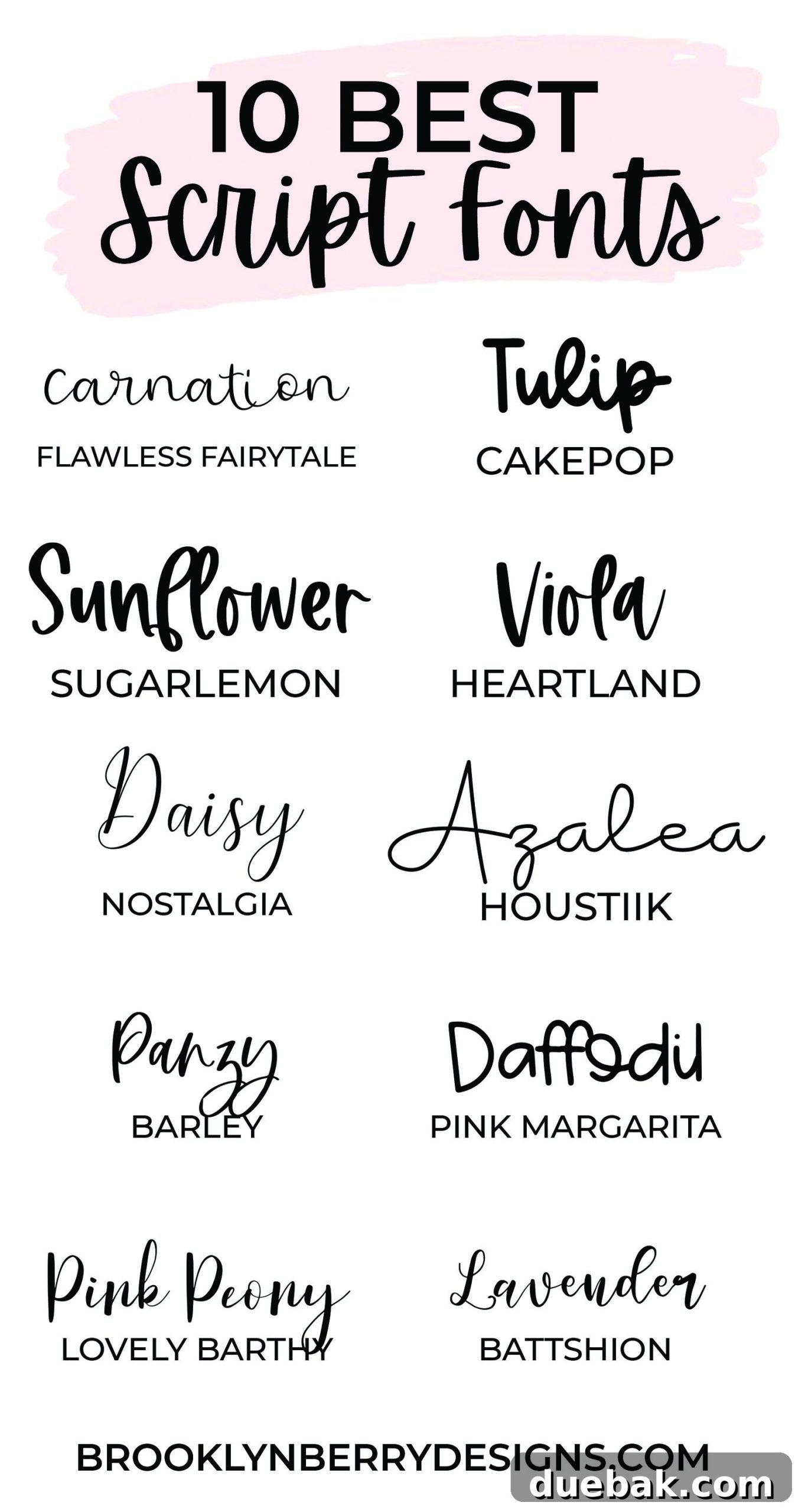
For illustrative purposes, I’ve used these beautiful script fonts to write out the names of various flowers. Directly underneath each flower’s name, you’ll find the corresponding font’s name clearly written, allowing you to easily identify and explore each one:
- Flawless Fairytale: An enchanting and elegant script, perfect for adding a touch of magic and sophistication to your pins.
- Cakepop: A bold and playful handwritten script that brings a cheerful and friendly vibe to any design.
- Sugar Lemon: A sweet and legible handwritten script, ideal for a warm, inviting, and personalized feel.
- Heartland: A rustic and charming script, perfect for conveying authenticity and a cozy, down-to-earth aesthetic.
- Nostalgia: A classic and timeless script that evokes a sense of elegance and refined tradition.
- Houstiik: A modern and flowing handwritten script, offering a contemporary yet personal touch.
- Barley: A clean and versatile handwritten script, excellent for projects requiring a legible and natural feel.
- Pink Margarita: A quirky and fun handwritten font, ideal for adding a playful and unique personality to your designs.
- Lovely Barthy: A romantic and graceful script, perfect for designs that aim to be charming and elegant.
- Battshion: A bold and impactful script with a sophisticated touch, making it great for prominent headlines.
As for the clear, block font used underneath each flower name, that is **Montserrat**. This highly versatile sans-serif font is widely available on most online editing platforms and desktop design software, making it an excellent choice for pairing with more decorative script fonts due to its exceptional readability and modern aesthetic.
Final Thoughts on Elevating Your Pinterest Strategy
Mastering the art of typography for your Pinterest graphics is a journey that yields significant rewards. By investing time in understanding font categories, meticulously choosing fonts that resonate with your brand, and adhering to crucial licensing guidelines, you lay a strong foundation for a visually compelling and legally compliant online presence. Thoughtful font pairing and strategic color usage will transform your pins from mere images into powerful communication tools, captivating your audience and consistently driving valuable traffic to your website.
Remember, consistency is your greatest asset. Once you’ve established your brand fonts, stick with them across all your Pinterest creations. This builds recognition and trust, making your content instantly identifiable to your loyal followers and attracting new ones. Experiment with layouts, test different font combinations on your target audience, and most importantly, have fun with the creative process. Your dedication to excellent design will undoubtedly shine through, setting your pins—and your brand—apart.
Happy Designing!