
The Cricut Maker has revolutionized the world of crafting, offering unparalleled versatility and precision for creators of all levels. Now, with the introduction of four incredible new tools for the QuickSwap system – deboss, engrave, perforate, and wavy blade – your creative possibilities have expanded even further. If you’re looking to add professional finishes, intricate textures, and unique designs to your projects, these innovative tools are a must-have addition to your crafting arsenal. Keep reading to dive deep into what each new blade can do, explore a wealth of project ideas, and discover how to unlock the full potential of your Cricut Maker.
Unleash Your Creativity: Introducing Cricut Maker’s New QuickSwap Tools
Cricut continues to push the boundaries of DIY crafting with its powerful machines and ever-expanding range of accessories. The Cricut Maker stands as the flagship, renowned for its ability to cut hundreds of materials, from delicate paper to balsa wood and fabric. What truly sets the Maker apart, however, is its adaptive tool system, particularly the ingenious QuickSwap housing. This system allows crafters to easily switch between a variety of tips and blades, transforming their machine into a multi-functional powerhouse capable of scoring, cutting, debossing, engraving, and more. Recently, Cricut introduced four exciting new additions to this QuickSwap family: the Perforation Blade, Fine Debossing Tip, Wavy Blade, and Engraving Tip. These new tools are designed to elevate your projects, offering professional finishes and intricate details that were previously difficult or impossible to achieve with a home machine.
The beauty of these new Maker tools lies in their ability to broaden your creative horizons. Imagine crafting personalized leather jewelry, elegant embossed invitations, or unique stationery with perfectly perforated tear-off sections. The possibilities are truly endless! Throughout this comprehensive guide, we’ll explore each tool in detail, providing project inspiration and tips to help you master their use. Don’t forget that Cricut Design Space is regularly updated with new projects featuring these tools, many of which are included with a Cricut Access subscription, making it easier than ever to get started.
Understanding the Versatile QuickSwap System
At the heart of the Cricut Maker’s adaptability is the QuickSwap system. This brilliant design allows you to invest in a single housing unit and then interchange various blade and tip attachments. This not only saves you money but also reduces clutter in your craft space. The Cricut Maker comes standard with a fine-point blade for precise cuts on a wide array of materials and a rotary blade specifically designed for cutting fabric without a backing. The robust Knife Blade, ideal for thicker materials like balsa wood and chipboard, is available as a separate purchase and has its own dedicated housing.
Beyond these, all other specialized blades and tips are part of the QuickSwap family. This includes the Scoring Wheel and Double Scoring Wheel for crisp fold lines, and now the exciting new Perforation Blade, Wavy Blade, Fine Debossing Tip, and Engraving Tip! Swapping tools within this system is incredibly simple: just press the plunger button at the top of the housing to release the attachment. Then, easily insert your desired blade or tip, pressing the plunger again to secure it firmly in place. This seamless interchangeability makes the QuickSwap system a game-changer for crafters seeking maximum versatility and efficiency.
The Basic Perforation Blade: For Clean Tears and Interactive Designs
Identified by the number 11, the Perforation Blade is designed to create perfectly uniform perforated lines. These lines allow for clean, effortless tearing of paper and cardstock, adding an interactive and professional touch to your projects. No more struggling with uneven tears or imprecise cuts – the Perforation Blade ensures a crisp finish every time.
Perforation Blade Project Ideas:
- Raffle Tickets & Coupons: Create professional-looking raffle tickets for events or custom coupon books with easy tear-off sections.
- Journals & Notebooks: Design personalized journals or planners with tear-out pages, perfect for shopping lists or notes.
- “Take A Number” Signs: Craft functional signs for events, queues, or market stalls where customers can easily take a number.
- Interactive Cards: Add a fun element to greeting cards with a perforated reveal or a tear-away gift tag.
- Recipe Cards & Planners: Make meal planning sheets or recipe cards with tear-off grocery lists.
- Booklet Pages: Produce professional booklets or brochures with easily separable sections.
- Crafting Stencils: Create intricate stencils that can be carefully torn apart after use.
- Advent Calendars: Design custom advent calendars with perforated doors to reveal treats or messages.
This blade excels with various weights of paper and cardstock, giving you the flexibility to integrate perforations into a wide range of designs. Its precision makes it ideal for projects that require both aesthetics and functionality. For best results, always ensure your material is securely placed on the mat and use the recommended settings in Design Space.
The Cricut Perforation Blade is available for purchase either as a complete set with the QuickSwap housing or as the tip alone for those who already own a housing. View the Basic Perforation Blade + QuickSwap™ Housing.
The Fine Debossing Tip: Adding Elegant Dimension and Texture
Bearing the number 21, the Fine Debossing Tip is your go-to tool for creating stunning, crisp, and detailed designs that are pressed into your material. Unlike traditional printing or embossing, debossing creates an indented impression, adding a subtle yet sophisticated visual texture and dimension. It uses a rolling ball to press intricate patterns and shapes into a variety of materials, giving your projects a luxurious, high-end feel without the need for ink.
Fine Debossing Tip Project Ideas:
- Elegant Cards & Invitations: Create exquisite wedding invitations, thank-you cards, or greeting cards with debossed borders, monograms, or intricate patterns.
- Personalized Stationery: Elevate your letterheads, envelopes, and notepads with subtle, debossed logos or designs.
- Gift Tags & Packaging: Design unique, textured gift tags or add a custom debossed logo to favor boxes and packaging.
- Leather & Faux Leather Accessories: Deboss designs onto small leatherette jewelry pieces, keychains, or tags for a sophisticated, custom look.
- Art Prints & Wall Decor: Add textured elements to art prints on heavy cardstock or foil poster board for a gallery-quality finish.
- Book Covers & Journal Embellishments: Enhance the covers of handmade books or journals with debossed titles or decorative elements.
- Bookmarks: Craft personalized bookmarks with debossed names or intricate patterns.
- Paper Crafting Embellishments: Use debossing to add delicate texture to scrapbook pages, photo albums, or decorative paper projects.
The debossing tip works wonderfully on thicker papers such as cardstock, foil poster board, and kraft board, but also extends its magic to materials like leather and faux leather. The effect on metallic foil poster board, in particular, creates a captivating play of light and shadow that truly highlights the debossed design. Remember to select the appropriate material settings in Design Space for optimal results, and consider using a debossing mat for extra precision on certain materials.
The Cricut Debossing Tip is available either as a complete blade and housing set or as the tip alone. View the Fine Debossing Tip + QuickSwap™ Housing here.
The Wavy Blade: Adding Artistic Edges and Playful Flair
Marked with the number 31, the Wavy Blade introduces a delightful new dimension to your cutting projects. Instead of a straight edge, this blade creates a beautiful, decorative wavy cut, instantly adding a playful, artistic, or whimsical touch to any design. It’s perfect for when you want to break free from traditional straight lines and infuse your creations with dynamic movement and flair.
Wavy Blade Project Ideas:
- Decorative Cards & Invitations: Give your handmade cards and event invitations unique wavy borders.
- Gift Tags & Envelopes: Craft custom gift tags with charming wavy edges or embellish envelopes for a special touch.
- Scrapbook Pages & Photo Mats: Add decorative borders to your scrapbook layouts or create wavy photo mats to frame your memories.
- Vinyl Decals & Iron-On Transfers: Cut vinyl for wall decals or iron-on vinyl for apparel with a fun, wavy silhouette.
- Felt Banners & Fabric Appliques: Create adorable felt banners, fabric appliques, or elements for soft toys with soft, wavy edges.
- Party Decor: Make festive party banners, cupcake toppers, or table decorations with a celebratory wavy cut.
- Bookmarks: Design personalized bookmarks with a distinct wavy edge for a unique look.
- Paper Flowers & Embellishments: Add wavy cuts to paper flower petals or other paper embellishments for added texture and visual interest.
The Wavy Blade is incredibly versatile and can be used on a wide range of popular crafting materials, including vinyl, iron-on vinyl, cardstock, felt, and various fabrics. Whether you’re aiming for a charming, rustic, or playful aesthetic, this blade allows you to easily customize edges, transforming ordinary cuts into extraordinary details. Experiment with different material thicknesses and speed settings in Design Space to achieve the perfect wavy effect for your specific project.
The Cricut Wavy Blade is available either with the QuickSwap housing or as a standalone blade tip. View the Wavy Blade here.
The Engraving Tip: Permanently Personalize and Intricate Designs
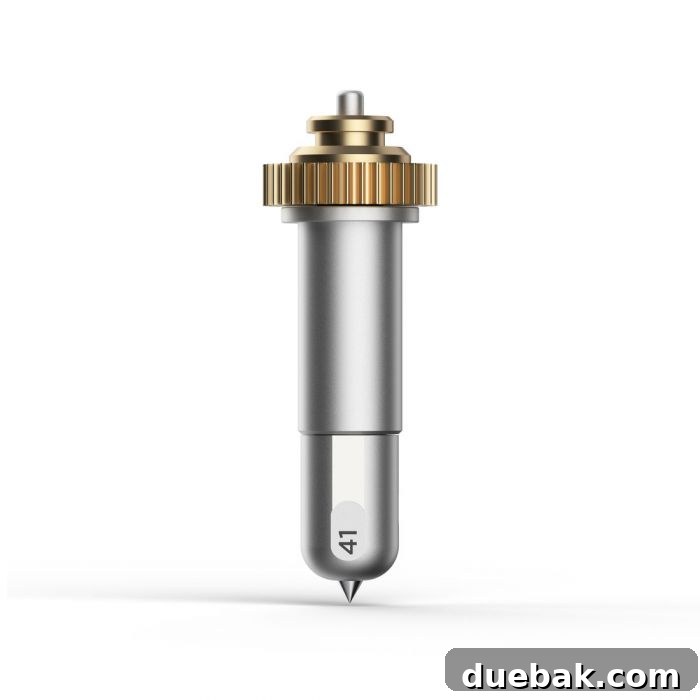
Distinguished by the number 41, the Engraving Tip is a truly transformative tool that allows your Cricut Maker to engrave intricate designs onto a variety of materials. This means you can add permanent, highly detailed personalization and artistic touches that elevate your crafts to a professional level. The engraving tip carefully etches designs into surfaces, creating a beautiful contrast and tactile experience that stands the test of time.
Engraving Tip Project Ideas:
- Personalized Jewelry & Accessories: Engrave names, dates, or small designs onto metal blanks for necklaces, bracelets, or keychains.
- Custom Dog Tags & Pet IDs: Create durable, personalized dog tags with contact information or fun designs.
- Metal Art & Home Decor: Engrave intricate patterns or quotes onto aluminum sheets for stunning wall art or decorative plaques.
- Acrylic Signs & Plaques: Produce elegant, custom acrylic signs for weddings, offices, or home decor.
- Leather Goods: Personalize leather wallets, journal covers, luggage tags, or coasters with engraved monograms or designs.
- Plastic Labels & Organizers: Create stylish and permanent labels for storage bins, spice jars, or drawer dividers.
- Coasters & Trivets: Engrave designs onto metal, acrylic, or soft metal coasters for unique gifts or home use.
- Personalized Gifts: Elevate any gift by adding an engraved message, name, or special date onto suitable materials.
The engraving tip is remarkably versatile, capable of working with metal sheets (like aluminum), soft metals (such as anodized aluminum), leather, faux leather, acrylic, plastic, and even specific types of wood (always test a small area first). To achieve the best results, ensure your material is firmly secured to the mat, and always refer to Design Space for the recommended material settings. After engraving, you may wish to gently clean the engraved area to remove any fine dust or debris, revealing the crisp, clean lines of your design.
The Cricut Engraving Tip is available for purchase either as a complete blade and housing set or as the tip alone. View the Fine Engraving Tip + QuickSwap™ Housing here.
Unlocking Potential with Cricut Design Space
The true magic of the QuickSwap tools, especially these new additions, is fully realized when paired with Cricut Design Space. This intuitive software acts as your creative hub, allowing you to design, edit, and send your projects to your Cricut Maker. Design Space offers an extensive library of ready-to-make projects that often feature specific QuickSwap tools. With a Cricut Access subscription, you gain unlimited access to a vast collection of images, fonts, and projects, making it incredibly easy to find inspiration and dive into new crafting techniques with your debossing, engraving, perforation, and wavy blades.
When using these tools, Design Space will automatically guide you in selecting the correct pressure and passes for your chosen material, ensuring optimal results every time. You can also customize your own designs, selecting specific lines to be debossed, engraved, perforated, or cut with a wavy edge. The possibilities for personalization are limitless, allowing you to bring your unique vision to life with precision and ease.
Getting Started: Tips for Success with Your QuickSwap Tools
To ensure a smooth and successful crafting experience with your new QuickSwap tools, consider these essential tips:
- Material Selection: Always use materials recommended for each tool. While some tools might work on others, testing a small, inconspicuous area first is always a good practice.
- Secure Your Material: Ensure your material is firmly adhered to the cutting mat. Any movement can cause inaccurate cuts or impressions. Use a brayer to press down firmly.
- Clean Your Mats: A clean mat provides the best adhesion. Regularly clean your mats to maintain their stickiness.
- Design Space Settings: Always double-check the material settings in Design Space. These are crucial for the correct pressure and number of passes required for each tool.
- Test Runs: Especially when working with new materials or complex designs, perform a small test cut or deboss on a scrap piece of the same material.
- Blade Care: Keep your blade tips clean and stored properly when not in use to maintain their sharpness and precision.
- Calibration: Periodically calibrate your Cricut Maker for optimal performance, ensuring all tools are cutting and creating impressions accurately.
Elevate Your Crafting with Cricut Maker’s Innovations
The addition of the Perforation Blade, Fine Debossing Tip, Wavy Blade, and Engraving Tip to the Cricut Maker QuickSwap system truly expands the creative horizons for every crafter. These tools empower you to move beyond basic cutting and scoring, enabling you to add intricate textures, elegant dimensions, artistic edges, and permanent personalization to an incredible array of projects. Whether you’re a seasoned crafter or just starting your DIY journey, these tools offer exciting new ways to express your creativity, impress friends and family, and even create marketable products. Embrace the versatility, experiment with new materials, and discover the endless possibilities that await with your enhanced Cricut Maker.
Ready to transform your crafting? Explore these new QuickSwap tools today and start bringing your most ambitious project ideas to life!
Looking For A Crafty Friend? Join Our Community!
Connect with fellow crafters, share your projects, and get inspired! Join our online community of crafty friends today.
More Crafting Inspiration & Cricut Resources
Everything you need to know about the Cricut Joy Xtra
Continue ReadingEverything you need to know about the Cricut Joy Xtra
Think Outside the Tee: Explore Unique Surfaces For Iron-On Vinyl
Continue ReadingThink Outside the Tee: Explore Unique Surfaces For Iron-On Vinyl
Where To Get Free SVG Files For Cricut and Silhouette
Continue ReadingWhere To Get Free SVG Files For Cricut and Silhouette
Cricut Watercolor Markers, Brush set, and Cards
Continue ReadingCricut Watercolor Markers, Brush set, and Cards
Shirt Design Sizing and T Shirt Placement Guide
Continue ReadingShirt Design Sizing and T Shirt Placement Guide
Cricut Hat Press: Everything You Need To Know
Continue ReadingCricut Hat Press: Everything You Need To Know