

As an enthusiastic crafter, my love for the Cricut machine is no secret. This versatile cutting tool has become an indispensable part of my creative journey, often accompanying me on girls’ weekends to help friends bring their imaginative projects to life. There’s a unique joy in crafting alongside friends, sharing ideas, and seeing designs materialize with the precision of a Cricut.
Recently, I’ve noticed a surge in questions regarding these incredible machines, particularly from those looking to purchase their first one. The sheer variety can be overwhelming, and many wonder which model best suits their needs. To help demystify the options, I wanted to share my insights and personal experiences, hoping to guide anyone contemplating a Cricut purchase.
My personal experience primarily lies with the more modern, cartridge-free machines. This includes various iterations of the Cricut Explore series: the original Explore, the Explore One, the Explore Air, and the Explore Air 2. While older Cricut models performed well, they typically required proprietary cartridges, which could become an expensive endeavor as each cartridge unlocked a limited set of images and fonts. The transition to digital design marked a significant leap forward, offering unparalleled creative freedom and accessibility.
Falling in love with the modern Cricut Explore machines was easy, precisely because they do away with cartridges. Instead, they leverage the powerful Design Space software, a cloud-based platform where you can purchase individual shapes and fonts, or even access a vast library of free content. This digital ecosystem opens up a world of possibilities, making it simpler and more cost-effective to expand your design library.
My initial “aha!” moment with Cricut happened at a party hosted by the company at Alt Summit. I was genuinely astonished by the sheer range of materials these machines could cut with incredible precision. It was clear that Cricut had evolved far beyond simple paper crafts and card making, venturing into fabrics, vinyl, and so much more. That experience truly sold me on the potential of these innovative tools.
Discovering Your Perfect Cricut Machine: A Comprehensive Guide
Choosing the right Cricut machine can feel like a big decision, especially with several excellent models available. The key is to match the machine’s capabilities with your specific crafting habits, project ambitions, and budget. Let’s break down the popular Cricut Explore family to help you pinpoint your ideal creative partner.
Considering Essential Crafting Functions: Writing and Scoring
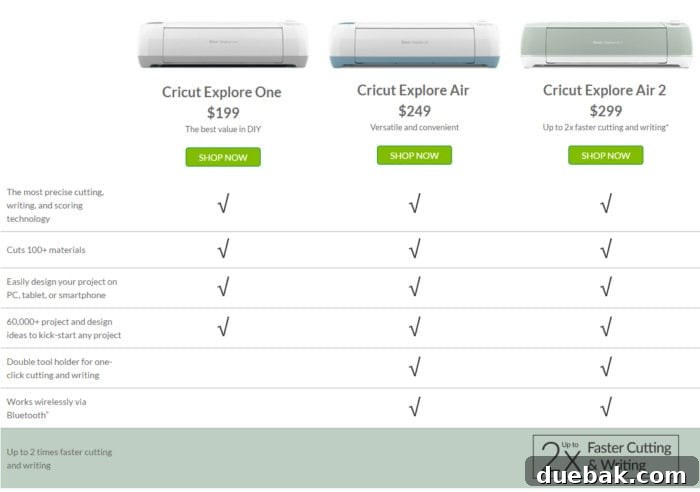
When evaluating the Cricut Explore models, it’s important to understand their core functionalities. All machines within the Explore series are engineered to cut materials with remarkable precision, delivering clean, crisp results every time. However, some offer additional features that significantly enhance your crafting potential.
Cricut Explore One: The Essential Entry Point
The Cricut Explore One stands out as the most basic and often the most budget-friendly option in the Explore lineup. Its primary function is cutting, which it performs flawlessly. This machine features a single carriage, designed to hold only a blade. This means it excels at precise cuts for vinyl decals, cardstock shapes, iron-on designs, and various other materials.
Connectivity-wise, the Explore One requires a USB cord to connect directly to your computer. While this setup is straightforward and reliable, it does mean you’re tethered to your workspace. For those desiring wireless freedom, an additional wireless adapter can be purchased separately, allowing for more flexible placement and usage.
The Explore One is an excellent choice for beginners who want to explore the world of smart cutting without a significant initial investment. It’s perfect for those whose projects primarily involve cutting shapes and designs, offering the high-quality results Cricut is known for at an accessible price point.
Cricut Explore (Original) and Explore Air (original): Elevating Your Craft
The original Cricut Explore machine (often referred to as the Explore Air 1 due to its subsequent wireless integration) takes the capabilities of the Explore One a step further. While sharing the same cutting precision, it introduces a crucial enhancement: a dual carriage system. This innovative design allows the machine to hold two tools simultaneously.
With a blade in one carriage and a pen or scoring stylus in the other, the Explore can not only cut but also write and score. Imagine creating intricate invitations where the machine precisely cuts the outline, then flawlessly writes the event details and scores the fold lines, all in one seamless operation. The ability to score paper makes creating perfectly folded cards, boxes, and 3D projects incredibly easy and professional-looking. Using a Cricut pen allows you to draw elaborate designs, add personalized messages, or sketch patterns directly onto your materials. This dual-functionality significantly expands the types of projects you can undertake, from personalized greeting cards to complex layered designs and custom stationery.
Embracing Wireless Freedom: Do You Need Bluetooth Connectivity?
One of the most appealing advancements in the Cricut Explore series is the integration of wireless capabilities, revolutionizing how and where you can craft. The Cricut Explore Air models, for instance, are designed with built-in Bluetooth connectivity, freeing you from the confines of a wired connection.
This wireless feature allows you to cut, score, and draw without the need to be physically connected to your computer. You can design on your iPad or iPhone using the intuitive Cricut Design Space app, then send your project directly to the machine via Bluetooth. This means you can work on your designs from the comfort of your couch, in a different room, or even while traveling, and then wirelessly send them to your Cricut when you’re ready to cut. It introduces a level of flexibility and convenience that wired machines simply can’t offer.
While the Explore One and original Explore can achieve wireless functionality with a separately purchased Wi-Fi adapter, the Explore Air series offers this out of the box, making the setup process even smoother. This mobile-friendly approach allows for greater spontaneity in your crafting, letting creativity strike whenever and wherever inspiration hits.
Do you already own a Cricut machine and need some helpful tips to get started or troubleshoot common issues? Be sure to check out my comprehensive Cricut FAQ guide here. It’s packed with valuable information to enhance your crafting experience.
Maximizing Efficiency: Are You in a Hurry or Cutting in Bulk?
For crafters who frequently tackle large projects, produce items in quantity, or simply value speed, the Cricut Explore Air 2 is an absolute game-changer. This model not only boasts all the beloved features of its predecessors but also introduces a revolutionary “Fast Mode,” capable of cutting projects up to twice as fast as previous Explore models.
The Explore Air 2 also comes in an array of beautiful, vibrant colors—such as Mint Green, Yellow, Purple, and many others—allowing you to choose a machine that matches your personal style or craft room aesthetic. But its beauty is more than skin deep; its enhanced speed is its most compelling feature.
If you find yourself making multiple copies of the same item—think custom t-shirts for a group, personalized mugs as gifts, large-scale art installations, or inventory for an Etsy shop or small business—the Fast Mode of the Explore Air 2 will be an invaluable asset. It drastically cuts down on production time, allowing you to complete more projects in less time, thus increasing your output and efficiency.
Many professional crafters and small business owners who rely on their Cricut machines often invest in multiple devices to parallel process their cuts. The Explore Air 2, with its 2X faster cutting speed, offers a significant advantage, potentially negating the need for a second machine for many users, ultimately saving both money and space. Its enhanced speed makes it a powerhouse for anyone looking to scale up their crafting or streamline their workflow.
Essential Accessories and Membership Benefits for Your Cricut Journey
Once you’ve chosen your ideal Cricut machine, maximizing its potential often comes down to having the right accessories and taking advantage of valuable membership options. To ensure you can dive into crafting immediately, I highly recommend acquiring a starter kit along with your machine.
A starter kit typically includes essential tools and a variety of basic materials like vinyl, iron-on, and cardstock. This provides tremendous value and, more importantly, ensures you don’t face the frustrating wait for supplies once your exciting new machine arrives. There’s nothing worse than getting a new creative tool and being unable to use it right away! Having materials on hand means you can unbox your Cricut and start creating almost instantly.
Beyond the initial supplies, consider exploring the Cricut Access membership. For a reasonable monthly fee (around $10, though pricing can vary), Cricut Access unlocks an enormous library of thousands of designs, ready-to-make projects, and premium fonts. This membership is a game-changer for many crafters, as it eliminates the need to purchase individual designs or fonts, which can quickly add up. It provides unparalleled creative freedom, allowing you to experiment with a vast array of styles and projects without worrying about additional costs. For most dedicated Cricut users, it’s truly the best and most cost-effective way to continuously fuel your creative endeavors.
In addition to starter kits and Access, you’ll likely find other accessories useful over time, such as different cutting mats (LightGrip, StandardGrip, StrongGrip), various tool sets (weeding tools, spatulas, scrapers), and specialized materials beyond what comes in a starter kit. These items further expand the versatility of your Cricut, allowing you to tackle an even wider range of projects.
I hope this detailed breakdown helps clarify the differences and advantages of each Cricut Explore machine, guiding you toward the perfect choice for your crafting ambitions. If you still have any lingering questions about which Cricut machine best suits your needs, please don’t hesitate to leave a comment below. I’m always happy to help fellow crafters!
*For those seeking even more advanced capabilities, the newest addition to the Cricut family is the Cricut Maker. This powerful machine can cut hundreds of materials, including thicker fabrics, balsa wood, and more, thanks to its adaptive tool system. To learn more about its unique features and how it differs from the Explore series, see my comprehensive FAQ on the Cricut Maker here.

