
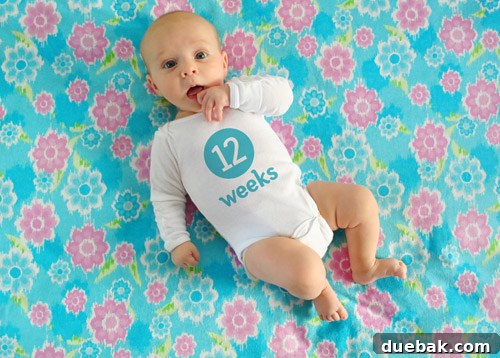
Capture Every Milestone: Your Guide to Adorable Weekly Baby Photoshoots at Home
Many aspiring parents and photography enthusiasts have reached out, curious about the magic behind those charming weekly photos documenting a baby’s first year. From our humble beginnings with Clara, we’ve perfected a simple yet effective system that transforms everyday moments into cherished keepsakes. If you’ve ever wondered how we consistently capture images like the ones you see, or if you’re keen to embark on your own family documentation journey, you’ve come to the right place. We believe that family photos are the ultimate DIY art and decor, especially when beautifully framed or compiled into a stunning coffee table book – a plan we eagerly anticipate for Clara’s collection. Documenting your baby’s first year through weekly photos is a heartfelt way to witness their rapid growth and changing expressions, creating a priceless visual timeline that your family will treasure for generations.
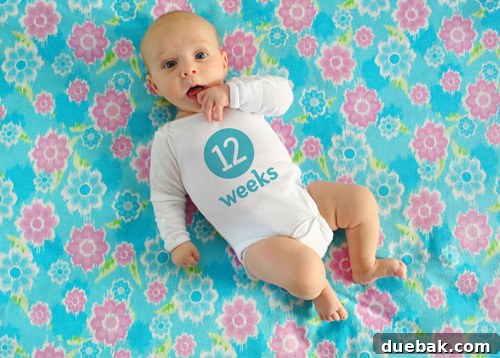
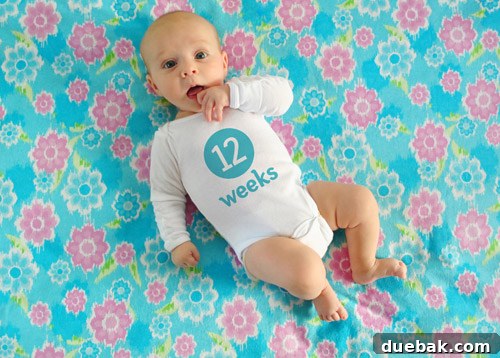
We’re not professional photographers, nor are we Photoshop gurus or seasoned baby wranglers. However, after twelve weeks of consistently capturing Clara’s milestones on various fabric backgrounds and digitally adding her age to her onesie in post-production, we’ve developed a streamlined process that truly works. This comprehensive guide will walk you through every step, ensuring you can replicate our success and create your own heartwarming series of weekly baby photos. Our method emphasizes simplicity, affordability, and consistency, proving that anyone can create stunning milestone memories right at home.
The Essential Pre-Shoot Preparation: Setting the Scene for Success
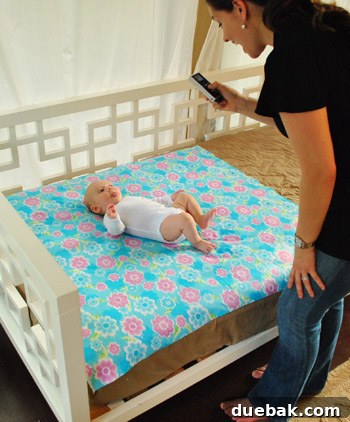
The secret to great baby photography lies in thoughtful preparation. Before you even click the shutter, setting the right environment and having the right tools can make all the difference. Our system is designed for ease, affordability, and consistency, allowing you to focus on capturing your baby’s unique personality as they grow. A well-planned setup minimizes stress and maximizes your chances of getting that perfect shot.
- The Iconic White Onesie: Your Blank Canvas: Clara consistently wears a plain white onesie for her weekly shots. This serves as a perfect blank canvas, allowing us the flexibility to add custom text in Photoshop later without any clashing patterns or colors. A simple, consistent base ensures that the focus remains solely on your baby and their adorable growth, rather than on changing outfits. We recommend having a couple of clean white onesies in appropriate sizes on hand, as babies tend to have growth spurts quickly!
- Budget-Friendly Backdrops: The Fabric Foundation: You don’t need elaborate studio equipment. We’ve found that just one yard of fabric per shot is sufficient for our purposes, significantly keeping project costs down. The vast variety of colors, textures, and subtle patterns available allows for creative expression without breaking the bank. Avoid overly busy patterns that might distract from your baby.
- Smart Fabric Sourcing: Saving Money on Style: Our go-to spots for fabric are discount stores like Hancock or JoAnn Fabrics. Always keep an eye out for sales and don’t forget to utilize those 40% off coupons to maximize your savings. Additionally, we’ve often repurposed already-owned fabric, blankets, or even pillowcases, making some backdrops entirely free. Look for materials that lie flat and have a soft texture to ensure your baby’s comfort and a smooth appearance in photos.
- Optimizing Your Lighting: The Golden Hour Indoors: We typically schedule our photo sessions in the early evening, around 5:30-6:30 PM. This timing is crucial because the light during this window is naturally indirect, producing soft, flattering illumination. Indirect light prevents harsh shadows that can obscure your baby’s features and avoids causing your baby to squint, ensuring clear, comfortable expressions and a peaceful photoshoot.
- Harnessing Natural Light: Your In-Home Studio: Our sunroom provides the most abundant natural light, making it our preferred shooting location. If a sunroom isn’t an option for you, consider setting up near a large window, ideally one that faces north or south to avoid direct, harsh sunlight. You can achieve a similar soft, natural look by positioning your baby on a blanket outside in the early evening, just after the sun has begun to dip but before it’s too dark, utilizing the natural ambient light.
- Choosing Your Camera: From Smartphone to DSLR: We use a Nikon D3000, an entry-level DSLR camera that, thanks to valuable community advice, we’re continuously learning to master. While a DSLR offers greater control over settings like aperture, shutter speed, and ISO, even a modern smartphone with good natural light can produce fantastic results. The key is understanding your camera’s capabilities and how to best utilize available light, focusing on getting a sharp, well-exposed image.
- Achieving Consistent Color: The Power of White Balance: To ensure that our photos maintain a consistent look and accurate colors from week to week, we always custom white balance our camera against Clara’s plain white onesie before we begin shooting. Most DSLR cameras have a specific setting for custom white balance, which is incredibly helpful for maintaining true-to-life colors under varying light conditions. This step is vital for professional-looking consistency throughout your series, making all your photos feel like part of a unified collection.
- Quantity Over Quality (Initially): Embracing the Chaos: Don’t be afraid to take a lot of pictures! We typically shoot between 75-100 frames to guarantee we capture that one perfect shot we both absolutely adore. Babies are delightfully unpredictable; capturing their fleeting expressions, sweet yawns, joyful smiles, or even a moment of serene contemplation requires patience and a generous number of clicks. Think of it as ensuring you have plenty of options to choose from, increasing your chances of finding that truly magical moment.
Mastering Post-Processing: Bringing Your Weekly Photos to Life
Once you’ve captured dozens of adorable shots of your little one, the next phase involves refining your selection and adding those personalized touches that make each weekly image special. This is where your chosen photo editing software comes into play, transforming raw images into polished, heartwarming memories ready for sharing or printing.
Step 1: The Art of Image Selection – Finding the Perfect Moment
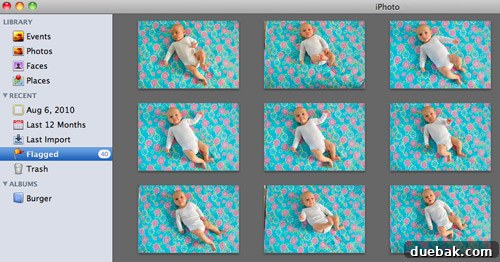
After a bustling photoshoot with our tiny model, it’s time to sift through the bounty of images and pinpoint that single, standout shot for the week. This can often be a delightful, albeit sometimes challenging, process. We use Apple’s iPhoto (or any photo management software like Adobe Lightroom or even your computer’s built-in viewer) to streamline this. Our method involves quickly deleting obvious duds, flagging promising candidates, and progressively narrowing down the selection. The goal is to find an image that not only beautifully represents Clara at her current age but also offers a fresh, engaging composition compared to previous weeks, ensuring diversity and visual interest across the entire collection. Look for clear focus, engaging expressions, good eye contact, and a pleasing overall balance in the frame.
Step 2: Essential Photoshop Touch-Ups for Perfection
Once the winning image is selected, we import it into Photoshop. Again, while we aren’t experts, we’ve refined a process that consistently delivers a convincing look for the text on her onesie. Before adding any text, some basic touch-ups are usually necessary to enhance the image’s overall quality and prepare it for customization:
- Cropping and Alignment: Adjust the crop to enhance composition, remove distracting elements, and ensure your baby is perfectly centered or placed according to your aesthetic preference (e.g., rule of thirds). This step helps frame your baby beautifully.
- Lighting and Color Adjustments: Sometimes, a slight tweak in brightness, contrast, or color vibrancy can make an image truly pop. We may lighten it a smidge if necessary, using tools like exposure, levels, or curves to bring out details and balance shadows and highlights without overexposing the image. A subtle saturation boost can also make colors more vibrant.
- Smoothing Out Fabric Wrinkles: Despite our best efforts with an iron, fabric backdrops can sometimes present stubborn wrinkles or creases. For these minor imperfections, we utilize Photoshop’s Healing Brush and Clone Stamp tools to virtually smooth out the fabric. These tools allow you to sample an area of clear, smooth fabric and “paint” over the wrinkled parts, seamlessly blending them away and ensuring a clean, professional background that doesn’t detract from your baby.
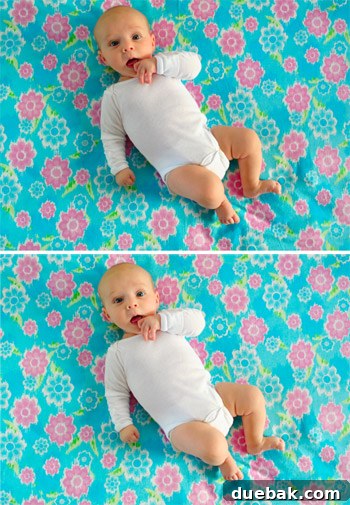
To illustrate the impact of these initial adjustments, observe the comparison below: the original picture straight from the camera on top, contrasted with the subtly lightened and de-wrinkled version underneath. The improvements are often subtle but significantly enhance the final image.
Step 3: Adding the Milestone Text – Personalizing Each Week
Now for the personalized touch: adding the weekly milestone text to commemorate your baby’s age. For efficiency, we usually copy the text layer from the previous week’s Photoshop file and simply update the number. However, if you’re starting from scratch, here’s how we achieve that charming look:
- Font Selection: We’ve found the free fonts Fyra for the circled number and Otari for the word “weeks” to be perfect. Both are freely available from FontSquirrel, a fantastic, trustworthy resource for high-quality, free fonts. These fonts offer a clean, legible, and charming aesthetic that beautifully complements the innocence of baby photos. Consider sans-serif fonts for clear readability.
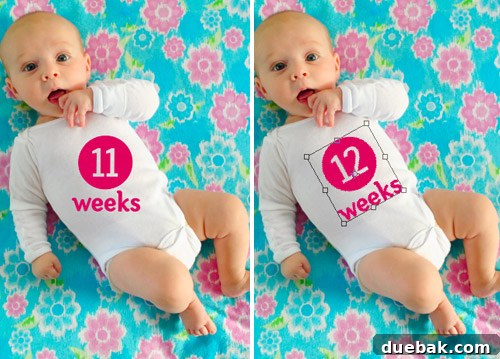
- Placement, Sizing, and Rotation: After dragging the text into your image, ensure the week number is correctly updated (e.g., changing “11 weeks” to “12 weeks”). A critical step for realism is to precisely size and rotate the entire text block to align seamlessly with the angle and natural curvature of your baby’s body or the folds of the onesie. This meticulous attention to detail makes the text appear organically integrated rather than simply superimposed.
Step 4: Choosing the Perfect Text Color – Harmonizing Your Image
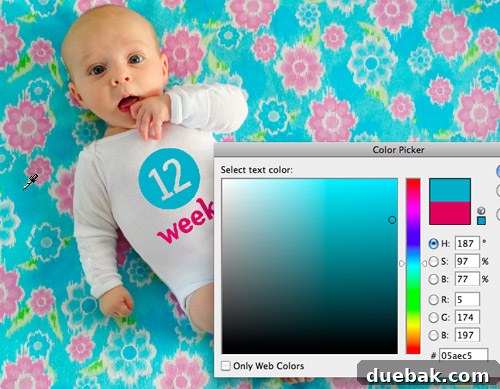
The color of your text can dramatically influence the overall harmony and visual appeal of the image. Our preferred method is to “snag” a color directly from the fabric backdrop itself using Photoshop’s Color Picker (eyedropper) tool. This ensures perfect coordination and creates a cohesive, professional look across the entire image. By pulling a color directly from the background, the text feels like an intrinsic part of the scene. Alternatively, for a more vibrant or contrasting effect, we sometimes select a complementary color to the fabric, such as the lovely plum-magenta text we used against a green background for week one’s photo. Experiment with different hues to find what best suits each week’s unique backdrop and brings out the character of the photo.
Step 5: The Magic Touch – Making Text Appear Genuinely Printed
This is the ultimate trick to make your digitally added text look as if it were genuinely printed on the onesie, rather than just floating on top. It’s a simple yet powerful combination of layer style and opacity adjustments in Photoshop:
- Blend Mode “Multiply”: Set the text layer’s blend mode to “Multiply.” This blend mode darkens the text’s underlying pixels, allowing the texture and subtle shading of the white onesie to show through. The “Multiply” effect makes the text integrate with the fabric, mimicking how ink would absorb and appear on cloth.
- Adjusting Opacity for Realism: Next, reduce the layer’s opacity to somewhere between 60% and 80%. The exact percentage will depend on the chosen color’s saturation and how much you want the onesie’s texture and underlying color to show through. This step softens the text, preventing it from looking like a stark, artificial overlay and enhancing its printed appearance.
- Final Color Refinement: Occasionally, after applying these steps, the color might appear too light or washed out due to the blend mode and opacity. Don’t hesitate to slightly adjust the color hue, saturation, or brightness of the text layer to achieve the perfect balance and vibrancy, ensuring it still stands out but remains naturally integrated.
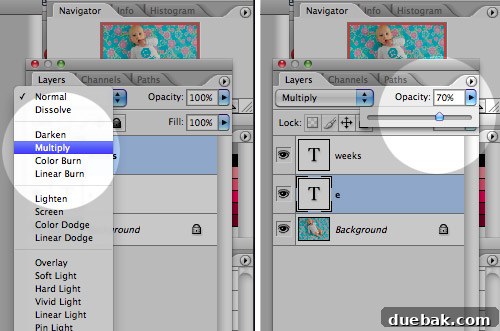
The transformation is subtle yet powerful. Below, you can see the image before and after applying the “Multiply” blend mode and opacity adjustments. Notice how the text subtly picks up the shading and contours of the onesie beneath it, effectively tricking the eye into believing it’s been there all along. A small note on realism: if Miss Clara’s outfit is particularly wrinkled or bunched up, sometimes I have to employ more advanced text manipulation techniques like chopping and skewing individual letters or parts of the text to follow the fabric folds. While this process is more intricate and not something I’d comfortably advise without a full tutorial, it’s definitely easier when the onesie is smooth – a blessing that often occurs when she’s on the verge of outgrowing it, stretching the fabric taut!

And with those final touches, our weekly masterpiece is complete, ready to be added to Clara’s growing collection!
The Journey Continues: Future Plans and Creative Inspiration
As we approach the one-quarter mark of this delightful year-long project, our excitement only grows for amassing all 52 unique images. Our ultimate goal is to have them professionally printed and bound into a beautiful coffee table book, a treasured keepsake for our home and an equally cherished gift for doting grandparents. Beyond the immediate joy, we strongly believe that Clara herself will get an immense kick out of looking back at her incredible weekly growth and the myriad of adorable expressions she displayed as a baby when she’s a little older. It’s not just a photo album; it’s a visual diary of her very first year, capturing the essence of her earliest days. You can always see larger versions of our current collection on Flickr, where we diligently upload the latest one every single week, sharing her journey with friends and family.
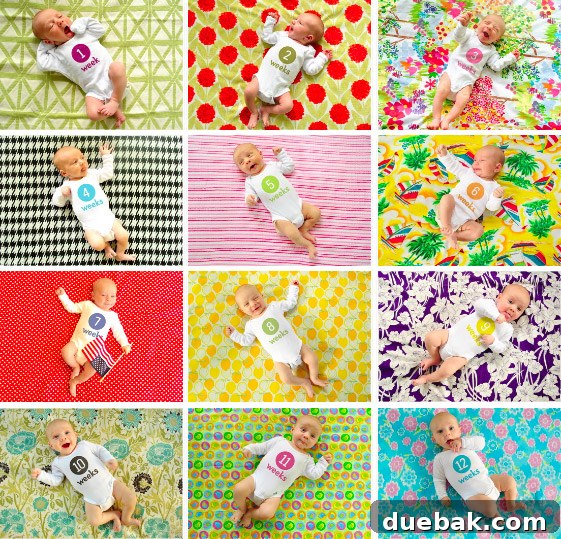
Now, regarding the ever-growing collection of fabric scraps from each photoshoot, we’re still debating their ultimate destiny! Ideas range from creating a patchwork quilt, perhaps a memory quilt adorned with pictures, to sewing some unique baby clothes or even small decorative items for her nursery. However, our latest and most exciting concept is to transform them into an eclectic-looking banner or bunting. This unique piece could then be proudly brought out for Clara’s birthday parties and used in future yearly growth pictures, serving as a beautiful, tangible homage to her unforgettable first year on Earth – at least until she reaches an age where she might find our sentimental indulgence a tad embarrassing!
Your Turn: Documenting Life’s Precious Moments
We genuinely hope this detailed, step-by-step guide to our weekly baby photo project has provided valuable insights and inspiration for anyone looking to adopt a similar method of documenting their loved ones. Whether it’s your own child, a beloved family pet (we’re absolutely on board with capturing their growth too!), or even transformations within your home, consistently capturing these evolving moments creates invaluable memories and a rich visual history. We’d absolutely love to hear about the fun and creative ways you’ve chronicled changes in your kids, family, or living spaces. Perhaps you’ve spotted someone else employing an interesting technique, like the utterly adorable Mila’s Daydreams project that captured our hearts with its creative approach. Please, don’t hold back – spill those sentimental beans and share your stories and tips with our community!
P.S. If you’re drawn to this milestone tracking idea but prefer a simpler approach without the intricacies of Photoshop, we discovered a fantastic company called Sticky Bellies. They offer removable monthly milestone stickers that can be easily applied to any baby clothing. These provide a quick, charming, and low-effort alternative to commemorate those precious weekly or monthly milestones, allowing you to achieve a similar visual effect without diving into advanced editing software.