
Creating a Timeless Keepsake: Your Baby’s Profile Silhouette Art
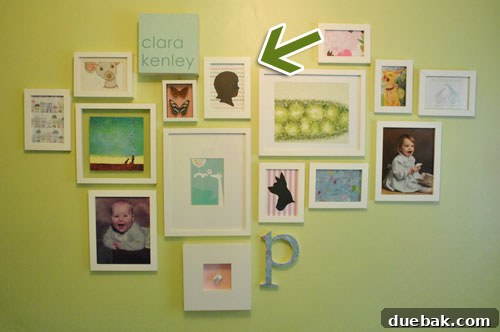
Every parent knows the joy and fleeting nature of childhood. From tiny fingers to curious gazes, we strive to capture every precious moment. But what if you could immortalize a truly unique aspect of your child’s early years – their distinct profile – in a classic, elegant art form? For too long, a generic placeholder silhouette stared back at us from Clara’s nursery wall, a constant reminder to capture her unique essence. Now, the time has finally come to replace that stand-in with a truly personalized representation of our little one: her very own silhouette.
This timeless art piece not only adds a touch of bespoke charm to any space but also serves as a beautiful, tangible memory of a specific age and stage. Follow along as we guide you through the process of transforming a simple photograph into a cherished silhouette, perfect for gifting or adorning your own home.
The First Step: Capturing the Perfect Profile Photograph
The foundation of any great silhouette is a clear, distinct profile shot. While we regularly snap Clara’s weekly photos (and you can find our tips on capturing those here), creating a silhouette requires a slightly different approach. The key is to eliminate distractions and highlight the unique curves of their face, head, and neck.
Tips for Your Silhouette Photo Shoot:
- Choose the Right Angle: Position your baby so their face is completely in profile. You want to see the distinct line from forehead to chin, with no frontal features visible.
- Simplify the Attire: We found it best to remove Clara’s onesie, as it tended to bunch around her neck and shoulders, obscuring the clean lines we needed. Opt for bare shoulders or a simple, fitted garment that won’t create bulk.
- Ideal Lighting: Soft, diffused light works wonders. We photographed Clara against a curtain in our sunroom, which helped create a natural backlighting effect, subtly starting the silhouette process even before editing. A window on an overcast day or indirect sunlight is perfect.
- Plain Background is Key: A simple, uncluttered background ensures that the focus remains entirely on your baby’s profile. A blank wall, a plain sheet, or a curtain works perfectly.
- Engage Your Subject: This is where the fun begins! To get your baby looking in the right direction, enlist a helper to make funny faces, hold a captivating toy, or sing a favorite song from the side. Patience is vital, as it often takes many attempts to get that perfect moment where they are still and looking just right. Sherry, with camera ready, expertly captured these fleeting glances.
- Take Plenty of Shots: Don’t settle for the first few! Babies are unpredictable. Take a burst of photos, try different angles, and capture various expressions. You’ll thank yourself later when you’re sifting through the options.

After a quick session and reviewing about 15 different shots, one photo stood out as the ideal candidate for transformation. Even with a minor detail like a slight lump at the back of her neck (which we knew could be easily refined), the clarity of her profile was exactly what we needed for a striking silhouette.

Transforming the Photo: Two Approaches to Silhouette Creation
Once you have your perfect profile shot, it’s time to turn it into a classic silhouette. There are two main methods you can employ: a low-tech, hands-on DIY approach or a more precise digital method using photo editing software like Photoshop. Both yield beautiful results, and your choice will depend on your comfort level with technology and your available resources.
Method 1: The Low-Tech, Hands-On Silhouette (No Photoshop Needed!)
This method is wonderfully accessible and perfect for anyone who prefers a tactile, crafty approach or doesn’t have access to advanced software. It’s surprisingly simple and can be completed in about ten minutes once you have your printout ready.
- Print Your Profile Photo to Desired Size: Print your chosen profile photograph onto standard printer paper. Don’t worry if the image appears a bit blurry from enlargement; the outlines are all that matter. The key is to size it appropriately for your frame. Consider printing a few different sizes to see which one fits best with your chosen frame and display area.
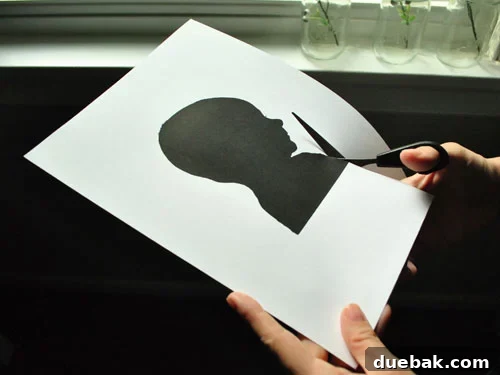
- Carefully Cut Out the Baby’s Head Profile: This step might feel a little strange, as you’ll be literally “cutting off your baby’s head” from the photo, but it’s essential for creating your template. Use small, sharp scissors to meticulously follow the outline of your baby’s profile, including the forehead, nose, lips, chin, and the back of the head and neck. Precision here will pay off in the final result, so take your time.
- Trace the Cut-Out Onto Black Construction Paper: Place your photo cut-out onto a sheet of black construction paper. Secure it lightly with tape if needed to prevent slipping. Using a sharp pencil, carefully trace around the entire perimeter of your cut-out. Ensure your pencil lines are clear but not too thick, as you’ll be cutting along them.
- Cut Out the Silhouette Shape: With your black construction paper now bearing the traced outline, use your small, sharp scissors to cut out this final silhouette shape. Take your time to achieve smooth, clean edges. This is your finished silhouette, ready for framing!
This method results in a charming, handcrafted silhouette with a distinct personal touch. It’s an excellent option for those who enjoy a bit of traditional crafting and want to avoid digital tools.
Method 2: The Digital Silhouette using Photoshop (or Similar Software)
For those comfortable with photo editing software, the digital approach offers greater precision, flexibility, and the ability to refine details. I opted for this method, partly because of convenience (and a lack of black construction paper on hand!).
The core idea is to manipulate the image’s contrast and brightness until only the silhouette remains, then refine it digitally before printing.
Step-by-Step Photoshop Guide:
- Crop and Straighten Your Image: Open your selected profile photo in Photoshop. Use the Crop Tool to focus tightly on your baby’s head and upper shoulders. Ensure the image is perfectly level and the profile is centered for optimal composition.
- Desaturate to Black & White: Go to “Image” > “Adjustments” > “Desaturate” (or “Black & White” for more control and options). This removes all color, laying the groundwork for a pure, monochromatic silhouette.
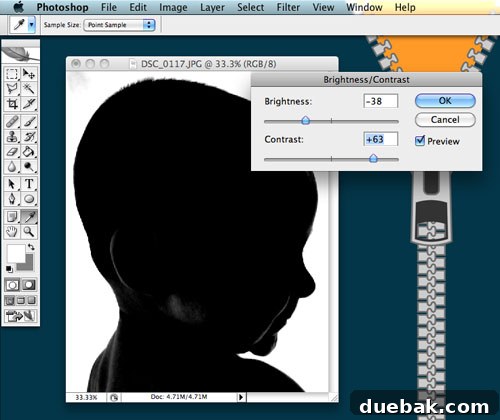
- Adjust Brightness & Contrast: Navigate to “Image” > “Adjustments” > “Brightness/Contrast.” This is the crucial step for creating the silhouette effect.
- Increase Contrast: Drastically increase the contrast slider. This will darken the shadows and lighten the highlights, making your subject stand out more sharply against the background.
- Decrease Brightness: Begin to decrease the brightness. Your goal is to make your baby’s profile turn completely black, while the background becomes as white as possible. Play with both sliders until you achieve a high-contrast, nearly silhouetted look. Don’t worry if it’s not absolutely perfect yet; we’ll refine it in the next step.
- Refine with the Paintbrush Tool: Now, for the fine-tuning that makes all the difference.
- Select the Paintbrush Tool: Choose a black color for your foreground.
- Fill in Dark Areas: Carefully paint over any remaining lighter spots or gray areas within your baby’s profile to make it a solid, uniform black. Adjust your brush size as needed for intricate areas, such as around the nose or chin.
- Clean Up the Background: Switch your foreground color to white and paint over any lingering dark spots, shadows, or imperfections in the background. Your aim is to ensure it’s a crisp, clean white canvas behind the silhouette.
- Add Artistic Details (Optional but Recommended): This is where you can elevate your silhouette from a simple outline to a work of art, adding personality and charm.
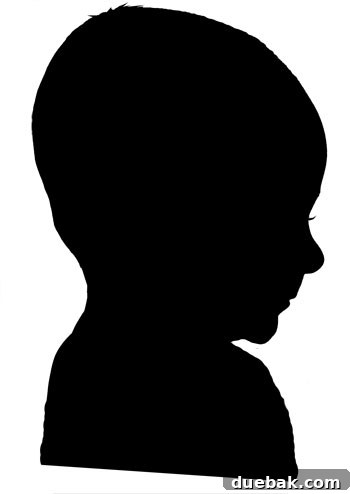
- Eyelashes and Hair Wisps: Using a very small black paintbrush, delicately add a few eyelashes or tiny wisps of hair. This gives the silhouette character and mimics the subtle details often seen in professionally cut silhouettes, making it feel more lifelike and artistic.
- Extend Shoulders: I also extended the shoulders slightly. This provides a little more ‘material’ to work with when cutting, allowing for a more traditional and elegant shoulder line. Don’t stress too much about perfectly clean lines on these added parts, as the physical cutting process will smooth them out naturally.
Printing, Precision Cutting, and the Big Reveal
With your digital silhouette perfected, the next step is to bring it to life as a physical object. The quality of your print and the precision of your cutting will significantly impact the final presentation of your handmade art.
Printing Your Silhouette:
- Choose the Right Size: Print your silhouette to the size appropriate for your desired frame. For our 5×7 inch frame, we printed the silhouette at approximately 3.5×5 inches, allowing for a nice border around it. Print a test page if you’re unsure about sizing to avoid wasting valuable photo paper.
- Paper Choice: For a crisp, professional-looking silhouette, use a good quality matte photo paper or thick cardstock. This provides a sturdy base for cutting, prevents ink bleed, and gives the final piece a substantial feel.
The Art of Cutting:
This is where “Steady Hands” Sherry Petersik truly shone. Precision cutting is paramount for achieving a professional and polished silhouette. Even if you’ve done a perfect digital job, sloppy cutting can undermine the effort.
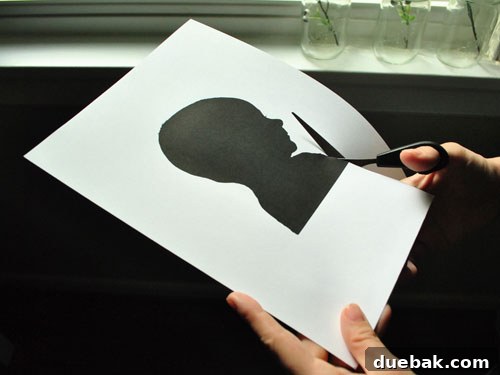
- Tools Matter: Use very small, sharp scissors. Hair-cutting scissors, craft scissors with fine tips, or even cuticle scissors can work exceptionally well. The smaller the blade, the more control you’ll have for navigating intricate curves and delicate areas. Sherry used the same small pair she uses for my hair trims – a true testament to their versatility and sharpness!
- Rotate the Paper, Not the Scissors: This is a crucial technique for smooth lines. Instead of trying to maneuver the scissors around tight curves, keep the scissors relatively still and rotate the paper as you cut. This technique allows for much smoother, more continuous lines and helps prevent jagged edges.
- Take Your Time: Rushing will inevitably lead to jagged edges and imperfections. Work slowly and patiently, especially around the delicate features like the nose, lips, and hairline. It’s often better to cut slightly outside the line and then trim inward for perfection rather than trying to cut precisely on the first pass.
The Official Head Swap: Displaying Your Masterpiece
Finally, the moment of truth! We carefully removed the old placeholder from Clara’s frame. The previous background, a vibrant 60-cent piece of craft paper from Michael’s, made way for our beautifully crafted silhouette. It was a funny moment, looking back at the placeholder, which wildly exaggerated the amount of hair we expected Clara to have! Oh well, she’s still got plenty of time to grow those luscious locks, and we’ll enjoy watching her profile evolve.
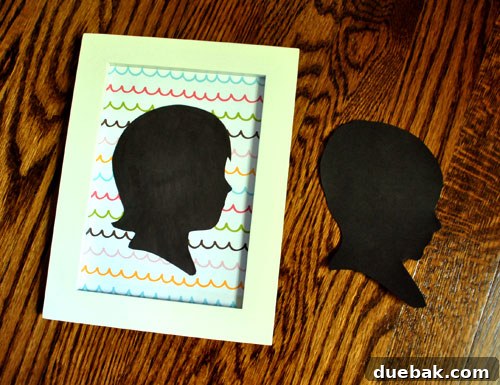
One subtle yet important detail we incorporated was the “traditional silhouette” shoulder cut. Before printing, I added ample black space at the bottom of the shoulders in Photoshop. This allowed Sherry to freehand a graceful, slightly curved shape at the base of the silhouette while cutting, giving it that classic, elegant finish often seen in historical silhouette portraits. This small detail elevates the entire piece.
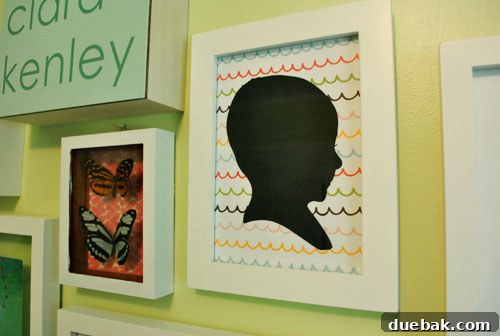
A Cherished Memory, Ever-Evolving
And with that, Clara’s sweet, round little head is officially and proudly represented on her frame wall. This project was more than just creating a piece of art; it was about capturing a fleeting moment and turning it into a timeless treasure. The satisfaction of a DIY project that results in such a personal and meaningful keepsake is truly unparalleled.
Of course, the journey doesn’t end here. We’d be lying if we said we weren’t already looking forward to updating her silhouette periodically as she grows – especially when that much-anticipated hair finally does make a grand entrance! A series of silhouettes showcasing her growth over the years will make an even more compelling and heartwarming display, creating a visual timeline of her precious journey.
Beyond Baby Silhouettes:
The beauty and versatility of silhouette art isn’t limited to babies. You can apply these same techniques to create personalized silhouettes of older children, adults, or even beloved pets! Imagine a gallery wall featuring the unique profiles of your entire family, a beautiful representation of your loved ones. It’s a wonderful, creative way to personalize your home decor, commemorate special occasions, and create unique, heartfelt gifts that will be cherished for years to come.
Have you embarked on any silhouette DIY projects yourself? Or perhaps cut out photos of someone’s head for other creative reasons? It always feels a little bit wonderfully weird, doesn’t it? Share your experiences, tips, and the charming stories behind your own silhouette creations in the comments below! We’d love to hear from you.
Psst- Curious about other items in our home or the specific paint colors we used in our projects? Simply click the button below to explore our curated selection and get inspired for your own home transformations!