

Embarking on a home renovation, especially a significant project like a kitchen redesign, can feel daunting. Transforming ideas into a tangible plan often requires more than just sketches on paper. This is where 3D modeling tools become indispensable, offering a virtual sandbox to visualize your space, experiment with layouts, and fine-tune details before making any irreversible changes. Having delved into the world of digital home planning for our own kitchen renovation, I’ve put three popular tools to the test: Floorplanner.com, IKEA’s Kitchen Planner, and Google SketchUp. While each offers unique advantages, there isn’t a single ‘best’ option for everyone. Instead, each excels in different scenarios, catering to varying skill levels, project scopes, and budget considerations. Let’s break down their features, pros, and cons to help you determine which 3D planning software is right for your next project.
Floorplanner.com: The User-Friendly 2D/3D Hybrid for Home Design
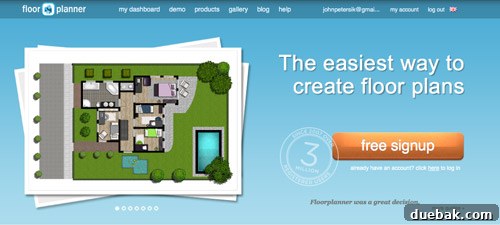
Floorplanner.com has long been our go-to for creating intuitive 2D floor plans, becoming a staple in visualizing room layouts across our projects. Its simplicity and accessibility make it an attractive option for those new to digital design. However, when it comes to the detailed requirements of a kitchen renovation, it reveals both its strengths and limitations. Let’s explore what makes Floorplanner a contender in the world of home design software and a popular choice for drafting floor plans.
Pros of Using Floorplanner.com for Your Projects
- No Software Download Required: One of Floorplanner’s biggest advantages is its browser-based operation. You can jump straight into designing without any installation, making it incredibly convenient for quick access from any computer with internet. This eliminates compatibility issues and saves valuable hard drive space, ideal for spontaneous design sessions.
- Remarkably Easy and Fast to Use: The interface is exceptionally user-friendly, featuring an intuitive drag-and-drop system that allows you to draw walls, place furniture, and define spaces with remarkable speed. For those with room measurements ready, a basic whole-house plan can be completed in mere minutes, making it ideal for conceptualizing layouts without a steep learning curve. It’s truly a tool designed for rapid visualization.
- Extensive Finish and Material Options: Floorplanner provides a broad selection of standard finishes, including various flooring types, wall colors, and textures. These options are often adjustable in color, enabling users to inject personality and realism into their designs. This capability is crucial for visualizing how different materials will look and feel within your virtual space, helping you make informed aesthetic choices.
- Rich Library of Furniture and Objects: The platform boasts a comprehensive library stocked with dozens of furniture options – from chairs and tables to rugs, plants, and appliances. While you might not find exact replicas of your real-life items, there are usually plenty of similar pieces that allow you to effectively arrange and decorate your virtual rooms, giving you a strong sense of scale, flow, and placement for your interior design ideas.
- Seamless 2D and 3D Toggle: Floorplanner offers the flexibility to switch effortlessly between a traditional 2D top-down view and a more immersive 3D perspective. This dual functionality is highly beneficial for both precise measurement-based planning (2D) and visual walkthroughs (3D), ensuring you can work in the view that best suits the task at hand, from initial layout to final presentation.


Cons of Floorplanner.com to Consider
- Freemium Model with Limitations: While you can create one project for free, continuous use or multiple projects often necessitate a paid subscription. This “kinda free” model can be a drawback for those with several ongoing design ideas or longer-term planning needs, requiring users to invest in a premium plan to unlock full functionality and avoid project limits.
- Restricted Kitchen Design Capabilities: Kitchens are arguably one of the most complex rooms to design due to the intricate arrangement of cabinets, appliances, and countertops. Floorplanner, unfortunately, falls short in offering highly specialized kitchen components. Its generic cabinet options can make it challenging to achieve a precise and detailed kitchen layout that reflects real-world configurations, limiting the scope for intricate cabinetry planning and custom kitchen design.
- Mediocre 3D Rendering Quality and Navigation: While it provides a 3D view, the rendering quality is somewhat rudimentary compared to more advanced tools. Navigation within the 3D environment can feel clunky, and users might encounter issues with elements not displaying correctly, such as distorted countertops or disappearing rugs, as observed in my own tests. Furthermore, customization options in 3D might be limited primarily to wall colors, often nudging users back to 2D for most design modifications.

Best Use Case for Floorplanner.com
Floorplanner is an excellent choice for individuals who prioritize speed and ease of use over hyper-realistic detail. It excels at creating quick conceptual 2D floor plans for a single room or even an entire home. Its vast furniture library makes it perfect for experimenting with furniture arrangements and spatial planning, particularly for those who are short on time, new to design software, or simply need to visualize basic layouts without getting bogged down in intricate details. It’s a fantastic starting point for any home design enthusiast looking for an intuitive floor plan creator.
IKEA’s Kitchen Planner: The Realistic Retailer-Specific Solution for Kitchen Design
IKEA’s Kitchen Planner first caught my attention when we considered their cabinetry for a custom office desk. Impressed by that experience, it became my initial choice for drafting our kitchen’s new layout in 3D. This tool stands out by directly integrating IKEA’s extensive product catalog, offering a highly practical approach to kitchen design that bridges the gap between virtual planning and actual purchasing. Let’s delve into its features and see why it’s a top contender for those envisioning an IKEA kitchen.

Pros of Using IKEA’s Kitchen Planner
- Completely Free Access: After a straightforward software download, the IKEA Kitchen Planner is entirely free to use, requiring only a free log-in. This allows you unlimited access to design and save multiple kitchen layouts without any subscription fees or project limits, which is a significant advantage over freemium models, offering true accessibility for comprehensive kitchen planning.
- Support for Multiple Designs and Iterations: Unlike some platforms that restrict free users to a single project, IKEA’s planner allows you to save numerous different kitchen layout options. This flexibility is invaluable for comparing various designs, experimenting with alternatives, and refining your vision over time without hitting artificial project caps, crucial for iterative design.
- Designs Based on Real-Life IKEA Products: A major strength of this tool is its direct integration with IKEA’s product catalog. You design using actual cabinets, appliances, chairs, and tables available for purchase. This ensures a high degree of “reality” in your plan regarding dimensions, availability, and overall aesthetics. It even generates a convenient shopping list, streamlining the purchasing process if you commit to an IKEA kitchen, making it a powerful 3D kitchen design software.
- Extensive Real-Life Finish Options: Beyond just product selection, the planner lets you customize designs with real-life finish options from IKEA. You can choose from a wide array of cabinet sizes, front styles, drawer and shelf configurations, finishes, colors, and hardware. This level of detail allows for a very personalized look, albeit within IKEA’s specific product ecosystem, ensuring your virtual kitchen matches your real-world aspirations.
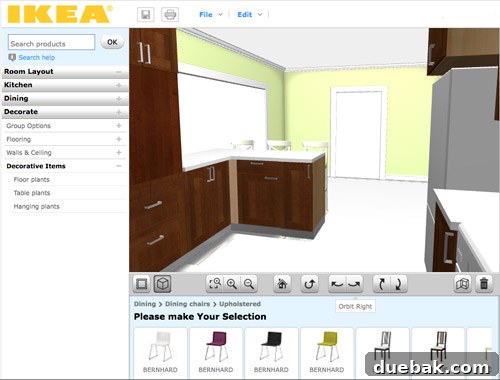
- Highly Realistic 3D Rendering: IKEA’s planner offers arguably the most life-like 3D view among the three tools compared. The renderings provide a clear, detailed, and aesthetically pleasing visualization of your future kitchen, making it easier to imagine the finished space and make informed design decisions about colors, textures, and layouts.
- Robust 2D and 3D Editing Capabilities: Similar to Floorplanner, it provides seamless toggling between 2D and 3D views. However, a key differentiator is that IKEA’s version offers equal and extensive editing capabilities in both perspectives. This allows users to work comfortably and efficiently, often finding themselves designing predominantly in the immersive 3D environment, offering a flexible workflow.


Cons of IKEA’s Kitchen Planner to Note
- Limited to Kitchens and Single Rooms: As its name suggests, this software is hyper-focused on kitchen design. It generally restricts users to planning only one room at a time, making it unsuitable for multi-room planning or visualizing how a new kitchen might integrate with adjacent spaces like a dining room through a doorway. This can be a significant limitation for holistic home renovation projects or open-concept layouts.
- Exclusively IKEA Products: While a strength for IKEA shoppers, this becomes a major drawback if your design aesthetic extends beyond the IKEA catalog. All cabinets, furnishings, and appliances are exclusively from IKEA, limiting your choices if you prefer products from other brands or a more eclectic style. It’s truly a tool for designing an IKEA kitchen, nothing more.
- Minimal Decorating Options: Even within the IKEA ecosystem, decorating options are quite limited. Beyond essential kitchen items, you won’t find a broad selection of decorative elements like rugs, armchairs for a seating nook, or even basic fruit bowls. The “decorative items” category often boils down to a few plant options, which can make your virtual kitchen feel somewhat sterile and less personalized, lacking the finer touches of interior design.
Best Use Case for IKEA’s Kitchen Planner
Unsurprisingly, IKEA’s Kitchen Planner is the undisputed champion for designing a kitchen, especially if you intend to purchase IKEA products. Its precision with real product dimensions and immediate shopping list generation makes the planning-to-purchase journey seamless. Even if you’re exploring alternatives, many IKEA cabinet sizes are standard enough to provide a realistic understanding of potential layouts. Just manage your expectations regarding decorative elements; it’s a functional planner, not a full interior decorator, ideal for anyone focused on an IKEA kitchen renovation.
Google SketchUp: The Professional-Grade Powerhouse with a Learning Curve
My journey to Google SketchUp began out of frustration with other tools that couldn’t handle multi-room designs. Recommended by many as a powerful 3D modeling tool, it quickly became evident that SketchUp is in a league of its own, offering unparalleled flexibility for those willing to invest the time to learn it. Although I’m still relatively new to its intricacies, its potential is clearly immense for complex home design and architectural projects. Let’s uncover its capabilities.
Pros of Google SketchUp for Advanced Design
- Completely Free (SketchUp Free Version): True to many offerings in the Google ecosystem, the basic version of SketchUp (SketchUp Free) is available at no cost. This makes professional-grade 3D modeling accessible to a wide audience, from hobbyists to students and serious DIYers, without a financial barrier to entry.
- Offline Accessibility (with Desktop Versions): While the free web version requires internet, the more robust desktop versions (SketchUp Pro) allow you to work offline once the software is downloaded. This is a significant advantage for users who might need to design in environments without reliable internet access or simply prefer the stability and performance of an offline application for their home design projects.
- Unrivaled Precision and Accuracy: Google SketchUp is renowned for its technical precision. It allows users to design with exact measurements, making it an invaluable tool for architectural planning, custom carpentry, or any project where precise dimensions are critical. This level of accuracy instills confidence, even when planning structural modifications like new doorways or custom built-ins, always with the understanding that professional consultation is paramount.
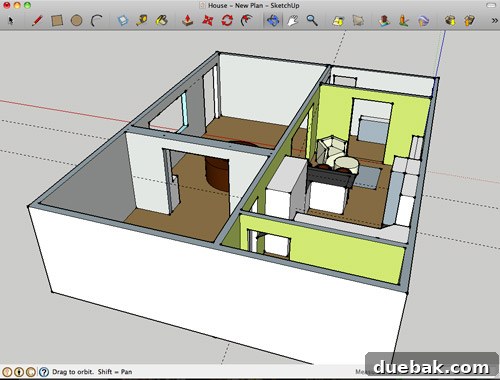
- Limitless Design Possibilities: If you possess the necessary time, skill, and patience, SketchUp’s capabilities are virtually boundless. You can model anything from intricate furniture pieces and entire buildings to cars and even complex organic shapes. This freedom means you’ll never be constrained by a limited library or pre-defined elements, offering true creative liberation for bespoke designs and innovative architectural visualization.
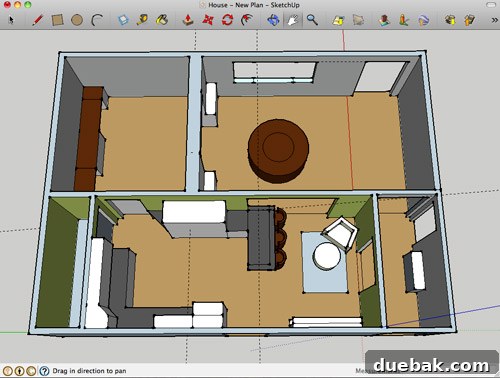
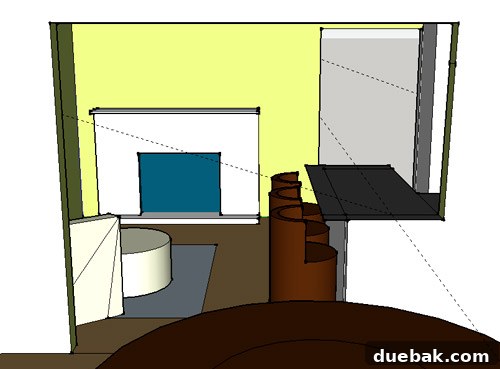
- Highly Functional and Flexible 3D Environment: SketchUp offers the most intuitive and flexible 3D navigation experience. Users can effortlessly orbit, pan, and zoom around their models, examining every angle, looking through walls, and inspecting details from above or below. While the rendering style is distinctly a “wireframe” or “sketch” aesthetic rather than photorealistic, this directness is often preferred for conceptual design, rapid prototyping, and detailed technical drawing.
Cons of Google SketchUp to Overcome
- Steep Learning Curve: Without a doubt, SketchUp demands the steepest learning curve among the three tools. Its technical nature requires dedicated time to master the various tools, commands, and workflows. Even after watching tutorials, new users often grapple with basic operations, leading to initial frustration and a slower design process until proficiency is achieved. It’s an investment of time, but a rewarding one.
- No Native 2D Floor Plan View: Unlike Floorplanner and IKEA’s tool, SketchUp doesn’t offer a direct, simple 2D floor plan view. While you can achieve a similar effect using the “Parallel Projection” camera viewed from the top, it still functions within a 3D environment, which can sometimes complicate precise 2D layout planning for users accustomed to traditional floor plan interfaces.
- Lack of Built-in Furniture Library: A significant difference from the other two tools is the absence of an integrated drag-and-drop furniture library. Instead, users must download models separately from the extensive 3D Warehouse. This requires an extra step for every object and can initially be a source of confusion for beginners who expect instant access to components. Manually drawing every element, as I did initially, is both time-consuming and unnecessary once you discover the vast resources of the 3D Warehouse.
- Initial Inflexibility and Editing Challenges: For beginners, making simple adjustments or tweaks can feel cumbersome. Selecting the correct edges and surfaces without accidentally skewing walls or floors requires careful attention, especially before understanding how to group objects or create components. Without these foundational skills, minor edits can become frustrating, highlighting the importance of learning proper modeling techniques early on. (Update: Discovering the power of grouping and components dramatically improves workflow efficiency, making edits much smoother.)
Best Use Case for Google SketchUp
SketchUp is the ultimate tool for highly customized, precise, and complex 3D modeling projects, especially if you’re willing to dedicate time to mastering its capabilities. It’s ideal for architects, professional designers, or serious DIYers who need absolute control over every detail, from structural modifications to custom furniture builds. Its accuracy and flexibility make it perfect for planning intricate elements like new doorways or custom cabinetry, where precise measurements are paramount. While the learning curve is steep, the payoff in design freedom and accuracy for home renovation planning is immense.
Choosing Your Ideal 3D Home Design Partner: A Comparative Glance
Selecting the right 3D home design software hinges entirely on your specific needs, skill level, and project objectives. To summarize, let’s look at how these three powerful tools stack up against each other on key dimensions, helping you find the best fit for your next home or kitchen design project:
- Ease of Use & Learning Curve:
- Floorplanner: Easiest to pick up, minimal learning curve, great for beginners and quick conceptual plans.
- IKEA Kitchen Planner: Moderately easy, intuitive for kitchen-specific tasks, designed for quick use by IKEA shoppers.
- Google SketchUp: Steepest learning curve, requires significant time investment but offers immense power and flexibility for advanced users.
- Cost:
- Floorplanner: Freemium model (one free project, then paid subscription required for extended use).
- IKEA Kitchen Planner: Completely free for unlimited kitchen designs and project saves.
- Google SketchUp: Free web version available (SketchUp Free), paid desktop versions for advanced features and professional use.
- Scope & Flexibility:
- Floorplanner: Good for general room layouts and furniture arrangements across multiple rooms, but limited in specific kitchen component detail.
- IKEA Kitchen Planner: Excellent for detailed kitchen planning with IKEA products, but strictly limited to single rooms and the IKEA catalog.
- Google SketchUp: Unlimited scope, capable of modeling anything from a single screw to an entire city. Highly versatile for any custom design or architectural project.
- 3D Rendering & Realism:
- Floorplanner: Basic 3D rendering, can be clunky, better for conceptual visualization rather than high fidelity.
- IKEA Kitchen Planner: Most realistic 3D renderings for kitchens, integrates real product textures and finishes effectively.
- Google SketchUp: Functional 3D visualization, distinctive sketch-like aesthetic, focused on geometry and precision rather than photorealism.
- Precision:
- Floorplanner: Good for general measurements and spatial planning, but not designed for architectural-grade precision.
- IKEA Kitchen Planner: Highly precise for IKEA products and standard kitchen dimensions, ensuring compatibility with real items.
- Google SketchUp: Unrivaled precision, capable of millimeter-level accuracy for detailed engineering, architectural plans, and custom fabrications.
In essence, if you’re looking for a quick, intuitive way to draft a floor plan and arrange furniture, Floorplanner is your friend. If your heart is set on an IKEA kitchen and you need a realistic preview of their products, the IKEA Kitchen Planner is unbeatable. But for those with ambitious, custom, and precise design visions – and the dedication to learn a powerful tool – Google SketchUp opens up a world of endless possibilities for advanced home and kitchen design.
Your Design Journey: Share Your Experience!
Ultimately, the best 3D home design software is the one that empowers you to bring your vision to life most effectively. My observations are based on relatively brief encounters with each program, providing a snapshot of their core functionalities. The world of home planning tools is constantly evolving, and user experiences vary widely. We encourage you to explore these options and find what resonates with your design process.
Have you used Floorplanner, IKEA Kitchen Planner, or Google SketchUp for your own renovation projects? Or perhaps you’ve discovered another fantastic 3D modeling tool that deserves a spotlight? We’d love to hear about your experiences, insights, and any tips or tricks you’ve picked up along the way. Your contributions can help fellow DIYers and aspiring designers navigate their own creative journeys in home design and renovation.